

How to Monitor Employees in the Office: Ethical Practices Every Employer Should Follow
August 17, 2026 16 min readAn office is full of signals, be it arrival times, project delays, long hours, system usage, or the everyday patterns managers observe around them.
The real skill, however, lies in deciding which of those signals deserve attention and what they actually reveal about the work.
Over the years, I have found that making that distinction starts with a simple management question, i.e., what exactly are we trying to understand? The answer to that determines which workplace data is relevant.
Monitoring can then be used to provide the evidence needed to examine the issue at hand.
Throughout this guide, I explain how to monitor employees’ computers responsibly by choosing the right form of monitoring and interpreting the resulting data in context.
Understanding How to Track Employees’ Work in 60 Seconds
- Legality: Employee monitoring can be lawful, but requirements depend on jurisdiction, method, purpose, and notice obligations.
- When needed: Use monitoring to resolve specific issues involving attendance, time use, workloads, projects, security, or digital activity.
- Best practice: Match the least intrusive method to the problem and verify context before acting.
- Benefits: Monitoring can improve consistency, accountability, feedback, and management decisions.
- Risks: Poor monitoring can reduce trust, increase stress, distort behavior, and create privacy risks.
- Ethical Boundaries: Set firm limits around privacy, personal information, intrusive surveillance, and public rankings.
- Software Selection: Prioritize configurability, reporting, retention controls, compatibility, administration, and scalability when choosing a tool.
Is It Legal to Monitor Employees in the Office?
Employee monitoring can be lawful, but there is no universal rule allowing employers to monitor anything they want simply because employees are at work.
The overall requirements primarily depend on the jurisdiction, monitoring method, purpose, information collected, and applicable notice or data-protection obligations.
For example, Connecticut law requires employers that fall under the statute’s coverage to provide employees with prior written notice of the types of electronic monitoring that may occur, subject to specified exceptions.
However, where requirements are uncertain, qualified counsel should assess the monitoring plan before implementation.
When Does Monitoring Employees in the Office Actually Make Sense?
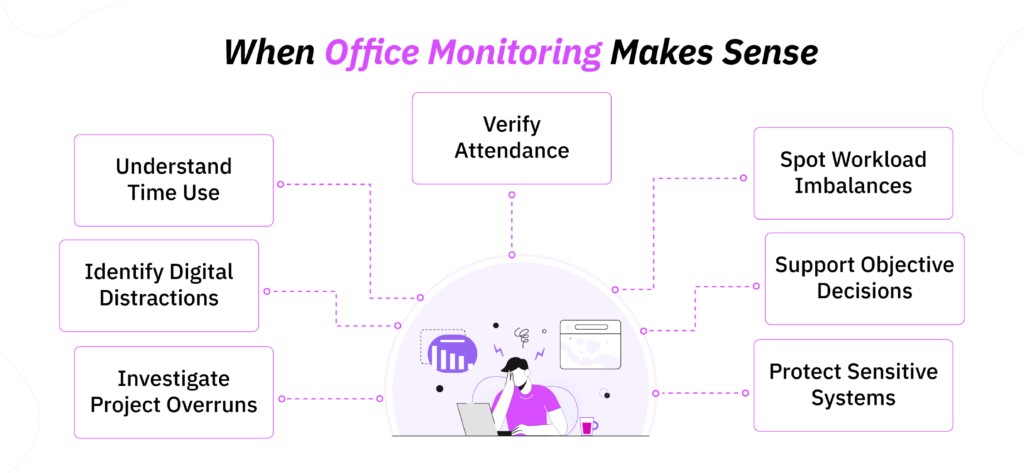
Different situations can arise in an office that managers cannot fully understand through manual supervision alone. Below, I break down these possible workplace scenarios where organizations might begin to ask how to track employees for additional evidence.
1. Attendance and Punctuality Are Difficult to Verify
Repeated late arrivals, early departures, short hours, unexplained absences, or overtime discrepancies can become difficult to manage when attendance depends on manual records alone.
In contrast, digital attendance systems can provide a more consistent record, with visibility into:
- Check-in and check-out times,
- Total worked hours,
- Late arrivals,
- Early departures,
- Absences,
- Recurring attendance patterns.
2. You Need to Understand How Office Work Hours Are Being Used
Even if employees are physically present in the office, managers cannot know from observations alone where their working hours are actually going.
Therefore, persistent overtime, missed deadlines, unusually long tasks, or unexplained gaps in recorded work can be difficult to diagnose.
In such cases, time tracking along with project and task records can show:
- Which projects consume the most time,
- Which tasks repeatedly exceed estimates,
- Where overtime is concentrated,
- Whether certain work periods repeatedly go unaccounted for,
- Whether time is fragmented across too many assignments.
3. Non-Work Websites or Applications Are Affecting Work
Occasional personal browsing is different from recurring non-work activity that begins interfering with an employee’s responsibilities.
To understand the extent of the problem, website and application monitoring can be used to see which sites and applications are being used, how long they are used, when that usage occurs, and whether a repeated pattern exists.
For example, if work repeatedly slows during a particular part of the day, web/app reports can help determine whether sustained non-work usage is contributing to it.
However, classifications must reflect the employee’s role. LinkedIn, for instance, may be essential for a recruiter even though it can be non-work-related for another position.
4. Projects Consistently Exceed Expected Hours
When projects repeatedly exceed their estimated hours, simply knowing who worked on them does not explain what caused the overrun.
Instead, project and task time tracking can help managers compare estimated and actual hours and identify whether excess time is concentrated around specific tasks, approval stages, project phases, or contributors.
That makes it easier to investigate possible causes such as:
- Scope changes,
- Inefficient processes,
- Repeated rework,
- Unrealistic estimates, or
- Poor allocation of responsibilities.
5. Workloads Appear Uneven Across an Office Team
Workload imbalances are not always obvious from observing an office.
For example, two employees may appear equally busy while one is responsible for substantially more projects and deadlines.
To understand the imbalance, managers can instead use team-level time and project reports to see where hours and assignments are concentrated across the team.
Overall, this information helps determine whether the underlying issue requires workload redistribution, scheduling changes, additional staffing, process improvements, or individual performance management.
6. Managers Need More Objective Information
Office managers can easily form impressions based on visible behavior like who arrives first and stays late.
Those observations may be useful, but they are incomplete.
Therefore, relevant monitoring records can supplement those impressions with more consistent information about attendance, project hours, task progress, workload distribution, and relevant digital activity.
7. Company Systems and Sensitive Data Need Protection
Monitoring can also be necessary when the concern is not productivity at all, but the security of company systems and sensitive information.
Depending on the risk:
- Access logs can identify unusual logins,
- App monitoring can record unauthorized application usage,
- File-access records can highlight abnormal file activity,
- Badge data can show attempts to access restricted resources,
- Security alerts can flag other suspicious or policy-relevant activity.
Together, these records can help security teams investigate suspicious activity and identify potential security incidents.
5 Different Types of Employee Monitoring in the Office
Employers have several monitoring methods available, but each answers a different question.
| Method | Best Suited To | What It Cannot Prove |
| Attendance tracking | Presence, start/end times, working hours | Productivity or work quality |
| Computer activity | Digital work patterns, apps, websites, activity | Overall work quality |
| CCTV | Safety, security, access, incidents | Overall employee performance |
| Access logs | Building or restricted-area access | Productive work |
| Call monitoring/QA | Interaction quality and customer-service standards | Overall employee performance |
How to Monitor Employees in the Office While Respecting Their Privacy: 7 Best Practices
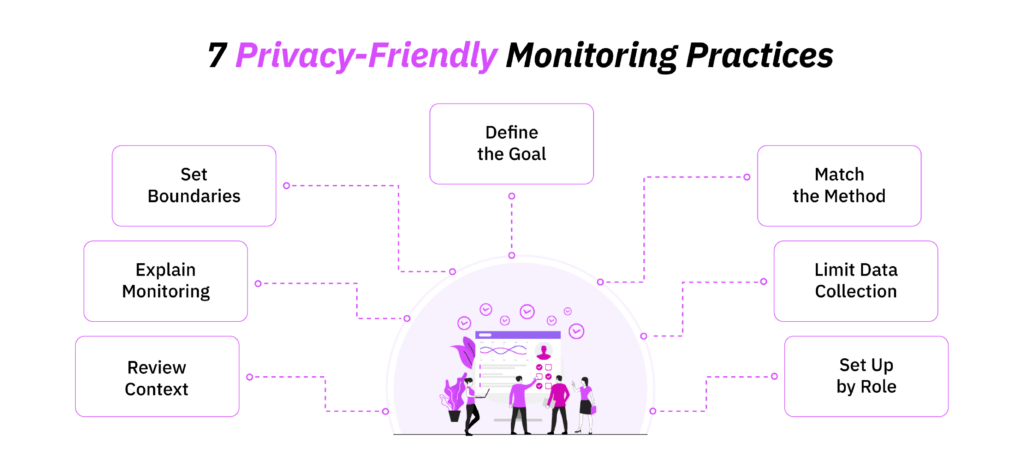
In my experience, even capable tools produce poor management decisions when the monitoring approach is too broad and poorly configured.
Therefore, the following practices share how to monitor employees’ computer activity in a way that keeps the data useful.
1. Define the Office Problem Before You Start Monitoring
As a decision-maker, you should always start with the management problem you are trying to solve, not the monitoring feature you want to enable.
For example, “We need greater visibility into employee activity” is too broad to guide a useful monitoring setup.
Instead, a more specific objective would be: “We need to understand why project hours exceeded approved estimates by 18% last quarter.”
That question immediately points you toward relevant information such as project time, task allocation, revision cycles, scope changes, and approval delays.
2. Match the Monitoring Method to the Problem
Once the problem is clear, select the monitoring method that can answer it directly.
| Office Problem | Start With | Don’t Automatically Jump To |
| Frequent late arrivals | Attendance records | Screenshots |
| Excessive overtime | Time/workload reports | Keyboard activity |
| Distracting websites | Web/app reports | Screen recording |
| Project overruns | Project/task time | CCTV |
| Uneven workloads | Team/time reports | Individual screenshots |
| Security concern | Security/access logs | Productivity scores |
| Quality problem | Output/QA data | Active-time percentages |
Matching the method this way prevents employers from using highly detailed monitoring for questions that simpler evidence can already answer.
3. Collect Only the Information Needed for That Purpose
Different forms of monitoring reveal different levels of detail; that is why you should use the lowest level that still gives you reliable information.
For example:
- Website duration may be enough without reviewing full browsing content.
- Application usage may answer the question without screen captures.
- Activity levels may be sufficient without continuous screenshots.
- Attendance records may resolve a punctuality issue without any computer monitoring at all.
The principle I follow in practice is straightforward: if removing a data point would not materially affect the decision, question whether you need to collect it in the first place.
4. Configure Monitoring According to the Employee’s Role
A useful monitoring system should reflect how different jobs are actually performed.
For example, prolonged LinkedIn use may be expected for a recruiter, while a designer may spend most of the day inside a single creative application.
Because those differences affect what “normal” activity looks like, configure monitoring around the role, including:
- Website and application classifications by role,
- Relevant working patterns,
- Appropriate activity settings,
- Monitoring depth,
- Team or user-level rules where needed.
For that reason, avoid one organization-wide definition of “productive activity.” Simply put, a metric can be technically accurate and still be unsuitable for the work you are evaluating.
5. Set Clear Limits on When Monitoring Runs
Always define when monitoring should begin and end to establish clear boundaries.
Those boundaries should be reflected directly in the configuration through:
- Scheduled working hours,
- Break periods,
- Company-owned devices,
- Relevant company systems,
- Start and stop conditions,
- Accidental collection outside intended work periods.
These controls become especially important when a workstation may also be used outside an employee’s scheduled hours.
6. Explain What Employees Are Being Monitored For
Employees should also know what the monitoring system actually does.
At minimum, explain:
- What information is collected,
- Why it is collected,
- When monitoring occurs,
- How the resulting information may be used.
It is also useful to explain what falls outside the monitoring scope. For example, you might clarify that personal passwords are not captured or that certain monitoring features are disabled.
Together, these explanations give employees a clearer picture of the monitoring scope instead of leaving them to assume that every action on a company device is being recorded.
7. Review Monitoring Trends Alongside Actual Work Results
Digital activity becomes more useful when you compare it with the work that employees are actually expected to produce.
To make that comparison meaningful, consider monitoring trends alongside an employee’s:
- Completed deliverables,
- Deadlines,
- Work quality,
- Project progress,
- Customer outcomes,
- Workload,
- Meetings,
- Collaborative or off-computer duties.
For example, suppose a monthly report shows that one employee recorded 27% more idle time than the team average, while their quality measures and project output remained consistently strong.
The discrepancy matters, but not because it automatically signals poor performance. Instead, it tells you that the activity measure may not fully represent how that employee performs the role.
TimeBee: Connect Employee Time With the Work That Actually Gets Done
Learn More
Pros and Cons of Monitoring Employees in the Office
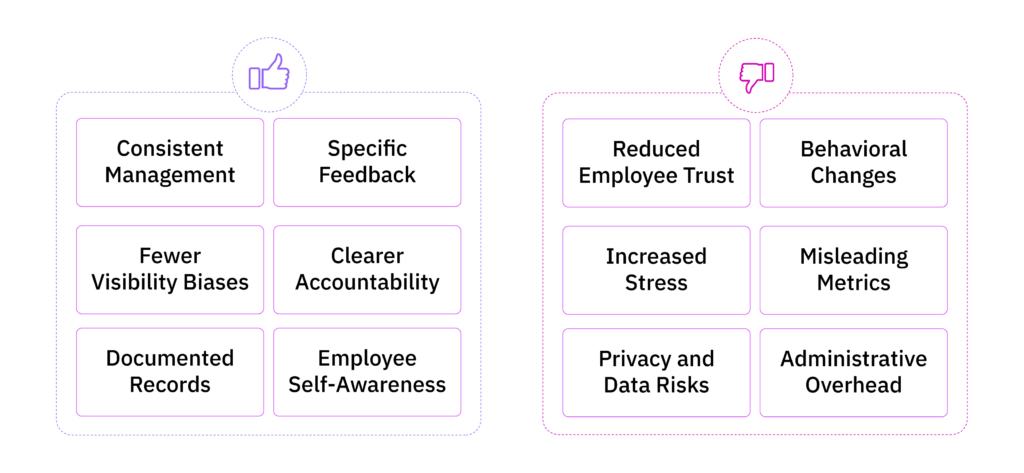
After finding the answer to how to track employees’ work, but before adopting monitoring, employers should weigh the practical value it can create against the consequences it may introduce.
That is why I have detailed the possible pros and cons of monitoring below.
Benefits of Monitoring Office Employees
- Consistent management: Monitoring can reduce differences in how individual managers assess similar situations by helping organizations create a more consistent evidence base for reviewing workplace patterns.
- Specific feedback: Concrete records can help managers move away from vague feedback and toward discussions based on identifiable patterns.
- Fewer visibility biases: In an office, employees who arrive early, stay late, or remain visibly busy can unintentionally receive more favorable impressions. Relevant monitoring data can introduce another source of evidence and reduce the weight placed on who is most physically noticeable.
- Clearer accountability: Once an organization decides what it genuinely needs to measure, managers are also forced to clarify what employees are accountable for with clearly defined standards.
- Documented records: When the same issue continues over time, monitoring records can give managers a chronological reference.
- Employee self-awareness: When appropriate monitoring information is visible to employees as well as managers, it can give people a clearer view of recurring habits, time distribution, or interruptions that they may not have noticed themselves.
Disadvantages of Monitoring Office Employees
- Reduced employee trust: Even legitimate monitoring can create resistance when employees do not understand its purpose.
- Behavioral changes: Employees who know their activity is being measured may start optimizing what the system can see instead of what truly matters, the work value.
- Increased stress: Constant awareness of being observed can make ordinary fluctuations in activity feel consequential. Over time, employees may become more concerned with appearing continuously active.
- Misleading metrics: Keyboard activity, mouse movement, application use, screenshots, and idle time may all be accurately recorded while still representing only part of the job.
- Privacy and data risks: More detailed monitoring also creates greater responsibilities around access, storage, retention, deletion, and inappropriate internal use for organizations.
- Administrative overhead: Monitoring systems still require managers to configure settings, handle employee concerns, and interpret reports, which add administrative workload.
Ethical Boundaries Employers Should Set When Monitoring Employees in the Office
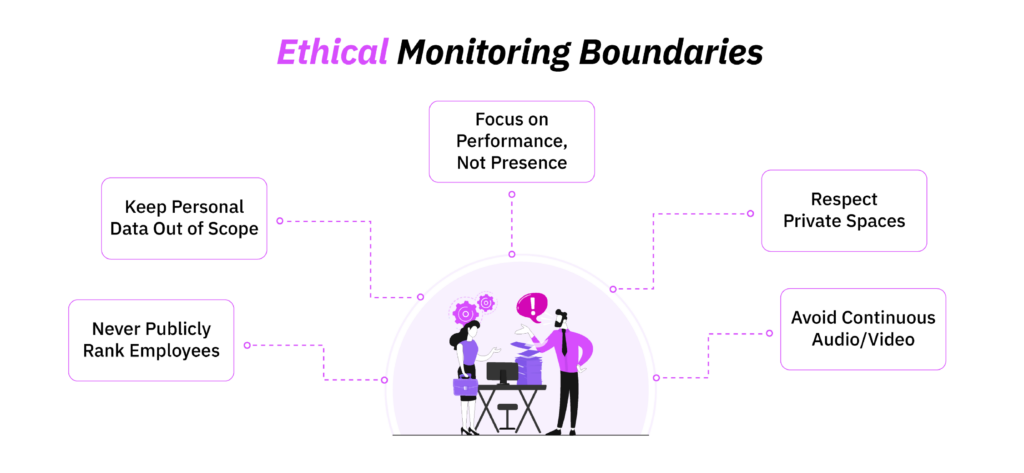
Some of the clearest lessons I have learned about workplace monitoring came from seeing what happens when an organization crosses boundaries it never needed to cross.
There was a time when I joined a firm where employee retention had declined by 16% over the previous year. As I reviewed exit feedback and employee concerns, monitoring itself was not the only problem. Instead, the larger issue was how the organization had allowed several intrusive practices to become normal.
Looking back, I know those practices should have been avoided from the outset, and monitoring should look something like this when done ethically:
1. Do Not Use Office Presence as a Substitute for Performance Measurement
One of the first issues I noticed was how strongly some managers associated physical visibility with performance.
Employees who arrived early and stayed late were often perceived as more committed. In contrast, employees who spent time in meetings, reviewing documents, collaborating with colleagues, or completing other less visible work were deemed less productive.
The problem was not simply that those impressions were subjective; it was that they also influenced how managers interpreted monitoring data.
That is why performance decisions should remain tied only to the relevant outcomes and work quality.
2. Never Monitor Areas Where Employees Need Strong Privacy
Another concern was that employees were unclear about where surveillance stopped.
Even when monitoring systems were introduced for legitimate reasons, the absence of clearly defined physical boundaries made employees question whether they could expect privacy in sensitive workplace areas.
Simply put, bathrooms, changing rooms, lactation spaces, and similar areas are fundamentally different from ordinary workspaces.
That is why monitoring in or around such locations can be extremely intrusive and may also create serious legal concerns depending on the jurisdiction.
To fix this issue, organizations should establish these red lines before deploying any surveillance technology.
3. Do Not Use Continuous Webcam or Audio Monitoring by Default
I also saw how quickly more intrusive monitoring could become normalized once the technology was available.
For example, in one part of the organization, employees raised concerns that audio or visual monitoring could capture conversations and activity unrelated to the original business purpose.
So much so that some employees even became more cautious about routine workplace discussions because they were unsure what might be recorded.
But if attendance records, time data, application usage, or another less intrusive method already answers the question, continuous audiovisual monitoring should not have been the default.
4. Keep Personal Accounts and Communications Out of Scope
Another boundary that should have been clearer was the distinction between monitoring company activity and collecting unrelated personal information.
When employees use company computers, personal account details, private messages, banking information, passwords, or other sensitive content can occasionally appear on screen. However, that does not make such information relevant to the employer’s monitoring purpose.
The problem with allowing monitoring to expand into this territory is that the organization begins collecting information simply because it is technically accessible.
To counter this, you should always define the scope around legitimate business activity from the beginning.
5. Do Not Turn Monitoring Metrics Into Public Rankings
The most damaging practice I observed was the use of monitoring data in ways that encouraged employees to compare their activity with one another.
In one instance, 38% of employees in an internal feedback exercise said they felt pressure to remain visibly active even when their work involved legitimate low-keyboard tasks.
At that point, the metric had begun changing behavior.
To meet the set threshold publicly, employees were avoiding reasonable breaks, keeping applications active unnecessarily, prioritizing easily measurable work, and generating keyboard and mouse activity simply because those behaviors improved their score.
What to Consider When Choosing Employee Monitoring Software for the Office
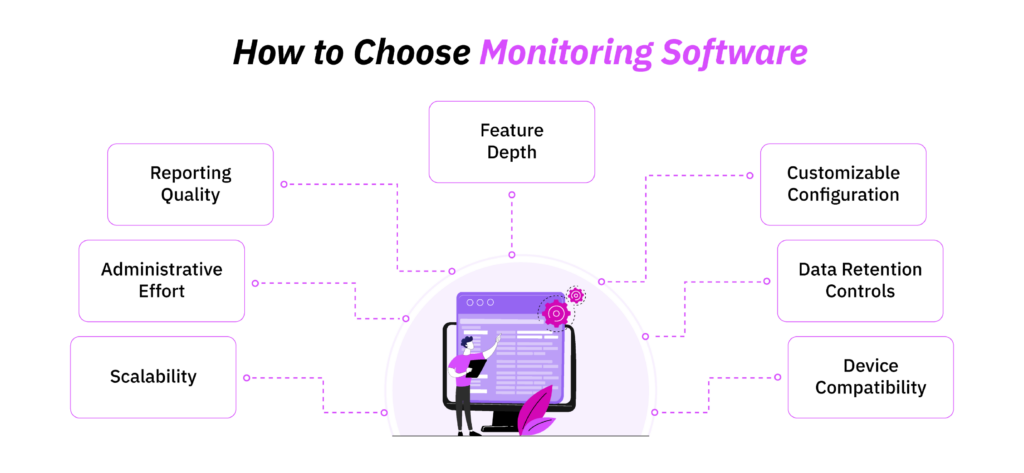
When I assess employee monitoring software from a People and Culture perspective, I do not start by counting features.
Instead, I look at whether the system can provide the information managers need without becoming difficult to configure and interpret as the organization grows.
In practice, that means evaluating the software across the seven areas given below.
1. Feature Depth
First, check whether the platform can support the monitoring your office actually requires.
Depending on your operations, relevant capabilities may include:
- Attendance and work-hour tracking,
- Website and application usage,
- Active and idle time,
- Project and task tracking,
- Screenshots,
- Team and individual reporting.
2. Customizable Configuration
Once you know the required capabilities are present, examine how much control you have over them.
A useful platform should let you configure monitoring according to the way your organization is structured. Look for options such as:
- Feature-level on/off controls,
- User- and team-level settings,
- Working-hour configurations,
- Screenshot frequency controls,
- Role-based access,
- Custom productivity classifications,
- Team-specific reporting.
This flexibility becomes particularly useful when several departments use the same system.
3. Data Retention and Deletion Controls
Monitoring software also creates a growing historical record, so determine what happens to that information after it has served its purpose.
Specifically, check:
- Whether retention periods can be configured,
- Whether records can be manually deleted,
- Whether automatic deletion is available,
- Whether screenshots or other records can be archived,
- Who has permission to delete information,
- Whether data can be exported when required.
4. Device Compatibility
Next, make sure the software fits the technology already used inside your office.
Check compatibility with the operating systems, browsers, and company devices employees use every day.
Depending on your setup, you may also need to consider multiple-monitor support, desktop deployment, browser-based access, or offline synchronization.
Remember, compatibility problems are more than an IT inconvenience. If one department can be tracked accurately while another cannot because of platform limitations, reporting across the organization will become inconsistent.
For that reason, evaluate the software against your actual device environment.
5. Reporting Quality
Also, take into account the reporting quality of a platform. When reviewing, within its dashboards and reports, check whether it offers:
- Data filters by employee, team, and date range,
- Identification of recurring trends quickly,
- Separate raw activity and calculated productivity classifications,
- Comparison of different forms of data where appropriate,
- Report exporting when further analysis is required.
6. Administrative Effort
Then consider how much ongoing work the system creates.
Beyond initial installation, someone may have to work on the following continually:
- User and team setup,
- Classification maintenance,
- Exception review,
- Reporting/corrections.
7. Scalability
Finally, evaluate what happens when the office becomes larger, or the teams become more complex.
Adding employees is only one part of scalability. The software should also remain manageable when you introduce:
- New departments,
- Additional managers,
- Multiple office locations,
- Different monitoring configurations,
- Larger volumes of monitoring data.
How to Monitor Employees’ Computer Activity Using TimeBee
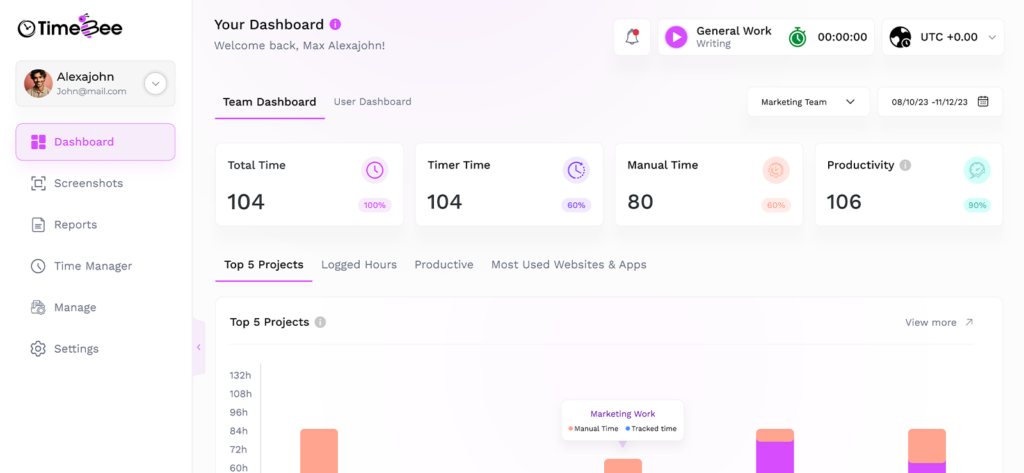
At this point, let me make the process more concrete by showing you how to monitor employees using an actual tool, in this instance, TimeBee.
1. Set Up How Employees Will Record Their Time
I would start with time capture because almost everything else in TimeBee builds on the hours employees record.
For office employees, I would usually enable time logging through its desktop app and web dashboard. However, for others, since TimeBee also supports tracking through the Chrome extension, mobile app, kiosk, and connected integrations, I would enable only the platforms that fit the way each team actually works.
Within the desktop configuration, I can also determine the idle-time threshold and control whether employees are allowed to delete timer-recorded time.
2. Account for Missed or Incorrect Time
A monitoring system also needs a way to deal with legitimate corrections. Otherwise, the data becomes less reliable simply because someone forgot to start a timer or assigned time to the wrong task.
In TimeBee, I will handle that through manual time or CSV imports.
For an individual correction, I would have the employee select the inactive window from their Timesheets and then add the start and end time, project, task, and billable status before sending it for approval.
However, for larger sets of records, such as historical time being transferred into the system, I would instead use CSV import and its validation process to flag any overlapping entries.
3. Configure Attendance Around the Actual Office Schedule
Once employees have a reliable way to record time, I would connect those records to the office’s attendance requirements.
At the organization level, TimeBee lets me define:
- Working days,
- Minimum required daily hours,
- Shift start and end times,
- Late-arrival margins,
- Early-leave margins.
If a particular employee follows a different schedule, I would simply use their custom attendance settings rather than changing the rule for everyone.
From there, the Attendance Report can give me check-in and check-out information, total tracked hours, and configurable tags such as Early Leave, Short Hours, and Absent.
4. Add Website and Application Data Where It Helps
If the question moves from when employees worked to how computer-based time was being used, I would then configure TimeBee’s website and application monitoring.
I would first classify unrated websites and applications as productive, unproductive, and neutral at the organization, team, and user level.
Once those classifications are in place, I would then use the Activity Summary and Web & Apps reports to review time spent across those categories.
If a pattern looks unusual, I can then move into the underlying activity.
5. Use Screenshots Only When the Additional Detail Is Necessary
If website and application records still do not provide enough information for a specific concern, TimeBee gives me the option to add screenshots.
Here, I would configure screenshot monitoring deliberately because the frequency can be adjusted and the feature can also be disabled altogether.
When enabled, the screenshot record includes the timestamp, associated website or application, and keyboard and mouse activity information.
6. Connect Recorded Time to Projects and Tasks
Using TimeBee, I would further see how the organization’s time is divided across projects, individual tasks, and contributors.
If one project is consuming more office hours than expected, I can then move beyond the employee’s total tracked time and inspect:
- The time recorded against the project,
- Time spent on individual tasks,
- Each assigned employee’s contribution,
- The project’s current status.
Moreover, since TimeBee also uses contributors’ hourly rates to calculate project cost, I would see which project consumed a large number of hours and what it cost the organization.
7. Use the Client Dashboard for Billing
For office teams working on client projects, I would take the same time data one step further using the client-oriented dashboard.
It is where client-specific information can be viewed, including relevant team members, project time, recorded hours, and external rates.
Then, I would review the time logs and use TimeBee’s billing calculation to create invoices.
Conclusion
Employee monitoring becomes meaningful when it gives managers a clearer understanding of how work is actually happening inside the organization.
Over time, that understanding can strengthen decisions around performance, accountability, workload, and operations because the manager is working with evidence rather than impressions alone.
Regardless, I would always bring that evidence back to the same question: what does this information help us understand that we could not understand as clearly before?
The answer determines whether a monitoring practice is genuinely useful and how much weight its data deserves.
Today, as monitoring technology becomes more sophisticated, that judgment matters even more because employers have access to increasingly detailed signals about their workforce.
However, only the organizations that use them well can turn those signals into better management.
FAQs
How to monitor employees’ computers in-office using the right approach?
Start by defining the business purpose first, then monitor only the computer activity relevant to it. To begin monitoring, configure settings by role and working hours, explain what is collected, and compare digital activity with actual work before making decisions.
What are 5 different ways companies monitor their employees at work?
Five common methods of monitoring employees are computer-activity software, digital attendance systems, CCTV, access-control systems, and call-quality monitoring. Each captures different information, so employers should choose the method that matches the specific workplace question they need to answer.
Can employers use CCTV to monitor employee productivity?
CCTV may be lawful depending on the jurisdiction and purpose, but it is generally better suited to security, safety, access, and incident investigation. However, before implementing it, employers should consider less intrusive alternatives and check applicable legal requirements.
How much employee monitoring is too much?
Monitoring becomes excessive when its detail, duration, or intrusiveness exceeds what is necessary for the stated purpose. If less intrusive data already answers the question, collecting screenshots, continuous video, or additional activity data may be disproportionate and deemed unnecessary.
Do employers have to tell employees they are being monitored?
Employee notice requirements depend on the jurisdiction and monitoring method. While some laws require employers to inform employees before monitoring begins, others necessitate transparency to help employees understand what is collected and why.
Get Clearer Visibility Into How Work Happens With TimeBee
Try Out TimeBee
Patricia Adams
Member since July 28, 2026
Patricia Adams
Member since July 28, 2026
Patricia Adams is the Director of People and Culture, who focuses on employee experience, people operations, performance management, and the responsible use of workforce technology.
She holds an M.S. in Industrial/Organizational (I/O) Psychology from Florida Institute of Technology. She is also a Certified Information Privacy Manager through the International Association of Privacy Professionals.
With more than 5 years of experience, Patricia examines how workplace systems affect both organizational performance and the people being measured.
Therefore, her work centers on helping organizations establish practical policies that support accountability without disregarding employee privacy and professional autonomy.