

Jibble Review: We Tried It on the Job. Here’s Our Verdict
By Jacob Tyler
October 21, 2026 16 min readRecording employee hours should be straightforward. Someone starts work, clocks in, takes their breaks, and clocks out.
The complications usually begin when those entries need to account for different work locations, missed punches, overtime, and payroll calculations.
Jibble attempts to bring those activities together through digital timesheets, attendance management, facial recognition, and location-based tracking.
However, having several ways to record attendance does not necessarily mean every method is equally dependable.
For this review, we conducted a two-week evaluation involving five accounts, six projects, two job sites, and 92 hours and 18 minutes of recorded work across desktop, mobile, and kiosk environments.
Read on to learn what is Jibble and how it performs in everyday workflows.
Jibble App: Our Findings in Under a Minute
| Category | Verdict |
| Overall score | 7.3/10 |
| Best for | Small businesses, fixed-location workplaces, and teams needing affordable, straightforward attendance tracking |
| Not ideal for | Organizations requiring strict identity and location verification, complex scheduling, detailed productivity monitoring, or comprehensive payroll management |
| Core purpose | Employee time tracking, attendance management, work schedules, facial recognition, geofencing, project-hour tracking, and payroll-ready timesheets |
| Setup difficulty | Moderate: Initial Jibble login and setup is straightforward, but configuring schedules, permissions, geofences, and kiosks requires additional effort |
| Platforms tested | Windows 11, macOS 26, iOS 26, Android 16, Android 15 tablet kiosk, and Chrome |
| Value for money | Strong value for money for basic attendance tracking, particularly with the free plan; less compelling for businesses needing advanced controls and reporting |
| Our recommendation | Suitable for smaller teams with simple attendance needs, but reliability concerns, restrictive policies, and manual corrections make it less dependable for complex workforce operations |
How We Put Jibble to the Test in Realistic Working Conditions
For this Jibble review, our testing group comprised a B2B software specialist, a user-experience specialist, an operations specialist, a field-work tester, and one additional participant representing an ordinary employee.
Over two working weeks, from September 21 to October 2, 2026, the team used five accounts covering one organization owner, one manager, and three employees.
We created six projects, nine activities, three work schedules, and two geographically separate work sites. Across 58 recorded work sessions, the workspace accumulated 92 hours and 18 minutes of tracked time.
The environment included a Windows laptop, a MacBook, an iPhone, an Android phone, and an Android tablet configured as a shared attendance kiosk.
A paid-feature trial workspace was used for advanced controls, with a separate Free workspace to check basic functionality and plan restrictions.
We then divided our assessment into five weighted categories, and Jibble scored 7.3/10 overall.
| Evaluation Category | Weight | Score |
| Accuracy and Reliability | 25% | 6.5/10 |
| Employee Experience | 25% | 7.0/10 |
| Everyday Performance | 20% | 8.0/10 |
| Administrative Control | 15% | 7.5/10 |
| Setup and Accessibility | 15% | 8.0/10 |
| Overall Score | 100% | 7.3/10 |
Accuracy and Reliability — 25%
Accuracy received the highest weighting because incorrect working hours can affect attendance, overtime, project costing, and payroll.
We conducted 32 timed sessions, lasting between 12 minutes and 2 hours and 25 minutes, using the Jibble time clock. Each session was compared against an independent stopwatch, with a tolerance of 60 seconds to accommodate the time required to operate and confirm the timer.
We also tried 11 manual adjustments, including missed punches, incorrect activity assignments, break corrections, and timing discrepancies.
Employee Experience — 25%
Employee experience received equal weighting because an attendance system needs to be practical for the people using it every day.
We recorded 25 routine clock-in attempts across web and mobile interfaces to identify delays and discrepancies.
Everyday Performance — 20%
To evaluate everyday performance, we observed employees switching between devices, working at separate locations, losing internet connectivity, and returning to existing sessions.
This included 18 cross-platform checks and six offline clock-in or clock-out scenarios.
Administrative Control — 15%
This category examined what managers could do with recorded information.
For testing, we attempted 12 administrative tasks, including correcting timesheets, reviewing employee access, changing schedules, examining attendance reports, approving entries, and preparing payroll-related records.
Setup and Accessibility — 15%
Finally, we evaluated the work required to prepare Jibble for employees and managers.
Our observations included the Jibble download experience, differences in app setup difficulty, the availability of user settings, and onboarding friction.
What Is Jibble?
Jibble is an employee time-tracking application that allows organizations to record working hours, manage timesheets, verify clock-ins, and prepare attendance information for payroll.
Employees can record their time through supported web, desktop, mobile, and kiosk workflows.
Jibble also offers facial recognition, GPS verification, geofencing, project tracking, leave management, and optional desktop monitoring features.
Its main identity, however, remains time and attendance management.
How Does Jibble Work?
Jibble operates through an organization-based workspace where administrators configure employees, permissions, time-tracking rules, projects, and attendance policies.
Employees then clock in and out using an allowed device. Depending on the organization’s configuration, a time entry may also include a project, activity, photograph, facial verification result, or GPS location.
The captured entries feed into timesheets and attendance records, which managers can review before exporting or transferring the relevant information for payroll.
This creates a relatively direct workflow from employee attendance to administrative reporting.
However, the reliability of the final record depends on successful clock-ins, suitable settings, and the correction of any exceptions.
Jibble Compatibility
Jibble supports time tracking through web browsers, Windows and macOS desktop applications, Android and iOS devices, and a Chrome browser extension. To evaluate its compatibility, we used the same workspace across five devices.
We additionally used Chrome on Windows to review administrative reports, change policies, and compare employee records.
Across 18 cross-platform checks, 15 updates appeared on the receiving device within 15 seconds, two required between 30 and 45 seconds, and one became visible after refreshing the dashboard.
However, the individual Jibble interfaces did not serve identical purposes.
Jibble app was more practical for GPS and facial verification on mobiles, while the desktop clients concentrated on time tracking and related computer-based functions.
We also found that the desktop kiosk was not an interchangeable substitute for a mobile kiosk since facial recognition, GPS, and geofencing were not available through the desktop kiosk.
Overall, Jibble’s platform coverage is broad, but organizations should select devices according to the attendance and verification methods they intend to use.
Jibble Setup
Jibble login and initial setup begin with creating an organization, inviting members, and deciding how employees should record their hours.
For our configuration, creating the organization, entering the initial account details, and inviting the first employee took 8 minutes 40 seconds.
The first employee successfully clocked in through the web app approximately five minutes later.
However, the complete configuration required considerably more time.
By approximately 24 minutes into the setup, we had added all members, assigned roles, and prepared basic projects.
Configuring work schedules, breaks, time restrictions, and employee permissions took another 25 minutes.
We then completed the location restrictions and mobile kiosk setup, bringing the total setup time to 67 minutes.
Therefore, Jibble was easy enough to start using, but preparing a structured workplace required more planning than the initial registration suggested.
Jibble Dashboard
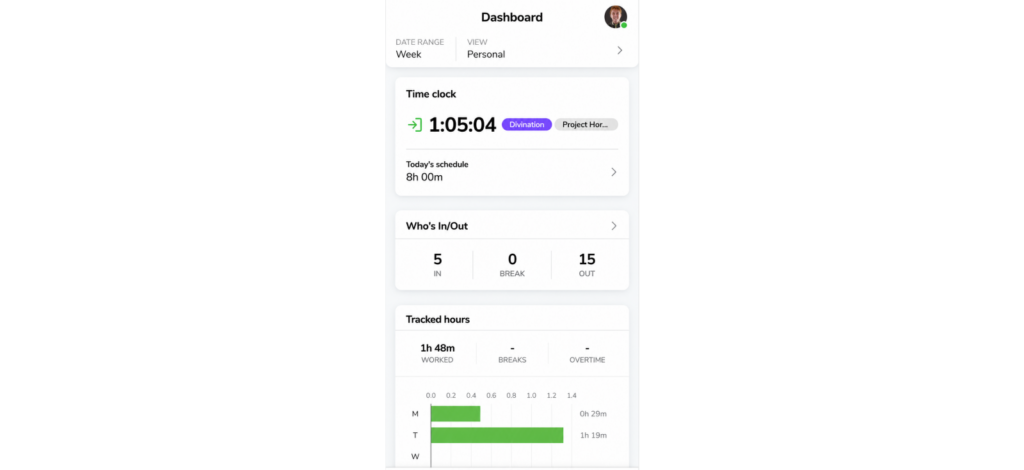
The Jibble interface provides managers with an overview of recorded hours and employee attendance.
Employees mainly need to start or stop time, review their previous entries, and select projects or activities when required.
In our employee workflow, opening the web dashboard and starting a prepared time entry required three interface actions and approximately 11 seconds.
By comparison, managers had more information to navigate.
The Jibble dashboard displayed attendance summaries, employee status, timesheets, projects, and relevant administrative settings. However, the most useful information depended on which task we were trying to complete.
For instance, viewing an employee’s current attendance status was straightforward, while locating an earlier entry requiring adjustment involved moving into the timesheet view.
Across 12 dashboard-navigation tasks, nine were completed without difficulty. Two required moving between multiple screens, and one required consulting the available help instructions.
Jibble User Roles
Jibble uses role-based access to distinguish ordinary employee activities from organizational administration.
To examine those boundaries, we created 12 permission-related actions across owner, manager, and employee accounts.
All 12 actions followed the expected access restrictions.
Employees could review their own relevant records but could not change organization-wide settings. The manager account had broader team visibility, while the owner retained access to the highest-level configuration controls.
However, permissions affected workflow convenience. For example, when the manager attempted to change a global time-tracking policy, the task required the owner account.
We also found that allowing employees to submit manual corrections did not eliminate the need for an approval process.
Jibble Data Collection
Jibble collects several categories of information depending on which features are enabled.
During a test, we compared the records visible after a standard web clock-in, a GPS-based mobile clock-in, and a facially verified attendance entry.
A web clock-in produced the expected employee, timestamp, duration, and work-assignment information.
The mobile location entry added location-related information, while the facial-verification workflow associated the attendance event with an identity-verification photograph.
Consequently, describing Jibble as software that only records when employees start and finish work would understate the information it can collect.
Jibble Offline Functionality
Jibble supports offline time recording on eligible applications, allowing employees to capture attendance when an internet connection is unavailable.
To examine this workflow, we attempted six offline scenarios: two on Windows desktop, two on Android personal mode, one on iPhone, and one using a mobile kiosk.
All six entries synchronized successfully, with four appearing within 30 seconds of reconnection, one taking 43 seconds, and the slowest requiring 76 seconds.
However, offline functionality was more restricted than normal connected tracking.
For example, project and activity selection were unavailable during offline clock-ins. Breaks, reminders, and automatic clock-out rules also did not operate in the same way.
Jibble Pricing: How Much Does It Cost?
Jibble offers a free plan for unlimited users, while its newer pricing structure lists paid subscriptions starting at $1.99 per user/month with annual billing.
- Free: $0 forever. Includes unlimited users, basic time tracking, timesheets, project tracking, GPS clock-ins, facial recognition, and limited work schedules and geofences.
- Essential: $1.99/user/month annually. Adds timesheet approvals, flexible break rules, and additional payroll-related controls.
- Growth: $4.49/user/month annually. Expands attendance management with unlimited job sites, teams, and kiosks, alongside more advanced reporting capabilities.
- Pro: $7.99/user/month annually. Introduces stricter attendance verification and accountability controls, including advanced identity checks such as AI liveness detection.
- Enterprise: Custom pricing. Provides enterprise-level requirements such as single sign-on (SSO), two-factor authentication, and self-hosting options.
We believe the Jibble free plan offers the clearest value for teams needing straightforward attendance tracking.
Bring More Structure to Workforce Tracking With TimeBee
Explore TimeBee
Jibble Features: What Worked and What Did Not During Testing?
| Feature | Availability | Collected Data | Requirements |
| Time Tracking | Free and paid plans | Clock-ins, clock-outs, durations, and manual time entries | Supported tracking method |
| Work Schedules | Free plan limited; advanced options paid | Working days, shift timings, break rules, and attendance settings | Plan and policy configuration |
| Attendance and Overtime Reports | Yes; options vary by plan | Attendance records, regular hours, overtime, breaks, and discrepancies | Configured schedules and calculation rules |
| Facial Recognition | Yes; verification reliability varies | Facial enrollment, identity verification, and associated clock-in records | Supported camera device and enrollment |
| Kiosk Mode | Yes; verification modes vary | Shared-device clock-ins, employee identities, PINs, and facial verification | Configured kiosk and supported verification |
| Location and Geofencing | Yes; advanced controls vary by plan | GPS coordinates, clock-in locations, and geofence records | Mobile permissions and appropriate settings |
| Project Tracking | Yes | Project hours, activity assignments, and employee time allocation | Project configuration |
| Payroll Calculations | Partial; no native payroll processing | Payable hours, overtime, break deductions, adjustments, and exported timesheets | Correct timesheets and external payroll processing |
Time Tracking
The primary function of Jibble’s time clock is to record when employees begin and finish work, but our testing revealed inconsistencies in its reliability.
We created 58 work sessions totaling 92 hours and 18 minutes and independently timed 32 of them. Of these, 27 recorded the expected duration within 60 seconds.
However, two sessions stopped unexpectedly while work continued, one clock-out was delayed, and two recorded discrepancies of 1 minute 21 seconds and 2 minutes 42 seconds.
Correcting these issues introduced further friction. Across 11 adjustments, including interrupted sessions, incorrect activity assignments, breaks, and timing discrepancies, we needed between 6 and 10 clicks per correction, taking a median of 2 minutes 35 seconds.
Consequently, Jibble’s time tracking required more frequent verification and manual intervention than we expected, particularly when sessions failed to record correctly.
Work Schedules
Jibble allows organizations to configure working days, shift timings, and attendance rules, but its scheduling flexibility has limitations.
Using paid-plan access, we created three schedules: an office shift from 9:00 a.m. to 5:30 p.m., a field shift from 7:30 a.m. to 4:00 p.m., and a four-hour part-time shift.
Across nine attendance scenarios, six produced the expected results. One discrepancy came from an incorrect employee assignment, while the remaining two exposed limitations with mixed paid/unpaid breaks and lunch deductions during GPS-based automatic clock-ins.
We also found that a schedule could accommodate only one break type, making recurring paid rest breaks alongside unpaid meals difficult to configure.
Overall, Jibble handled basic working-hour rules reasonably well, but its limitations made it less suitable for complex break policies and shift planning.
Attendance and Overtime Reports
To assess Jibble’s reporting accuracy, we generated nine reports covering employee attendance, regular hours, overtime, and breaks.
Six matched our independently calculated records. Of the remaining three:
- One showed a two-minute discrepancy,
- Another calculated overtime incorrectly because the employee was assigned to a schedule without the required overtime policy, and
- The third failed to deduct a configured unpaid lunch break during a GPS-based automatic clock-in.
We also examined three overtime scenarios. Two produced the expected results, while the third corresponded to the schedule-related discrepancy noted above.
These exceptions required us to correct the underlying records or settings and reconcile the affected reports manually.
Reporting itself was not particularly convenient either. We had to navigate different sections to retrieve attendance and timesheet information, while obtaining specific project totals required additional calculations.
Facial Recognition
Jibble’s facial recognition is designed to verify employee identities during clock-ins, but identity matching and enrollment reliability are important concerns.
To assess these issues, we attempted 30 facial verifications across five participants using an iPhone 15 and an Android tablet configured as a kiosk.
Enrollment was not entirely straightforward. Four participants registered their faces successfully on the first attempt. However, the fifth encountered repeated selfie-capture errors.
Even after six attempts, the application indicated that the image had been captured before returning a missing-face-data error. We eventually completed enrollment after restarting the process on another device.
The subsequent verification results were also inconsistent.
Of the 30 clock-in attempts, 18 correctly verified participants on the first scan, 8 required a second attempt, and 4 succeeded after a third attempt and lighting adjustments.
We also attempted six deliberate buddy-punch attempts in which one participant tried to clock in using another’s identity. Five were rejected, but one was incorrectly accepted.
Re-enrolling the affected participant’s face prevented a repeat in our subsequent check.
Consequently, we would be hesitant to recommend Jibble’s facial recognition as the sole safeguard against buddy punching without validating it across the actual workforce.
Kiosk Mode
Jibble’s kiosk mode allows multiple employees to clock in and out through a shared device, but configuring its verification methods can be cumbersome.
We used a Samsung Galaxy Tab A9+ as a shared kiosk for five participants. Initial PIN-based setup took 13 minutes, although switching to facial recognition required leaving kiosk mode to register employees’ facial data separately.
Across 24 PIN-based clock-in/out attempts, 22 worked without difficulty, while two required repeated member selection. All 24 were eventually recorded, with a median completion time of 14 seconds.
We also tested facial recognition speed 10 times. Eight attempts succeeded on the first scan, while two required another attempt. Although faster to operate, this mode prevented employees from selecting projects or activities during clock-in.
Overall, Jibble’s kiosk worked reasonably well for basic attendance, but repetitive navigation, facial-enrollment difficulties, and limited project selection made it less convenient for teams with varied assignments.
Location and Geofencing
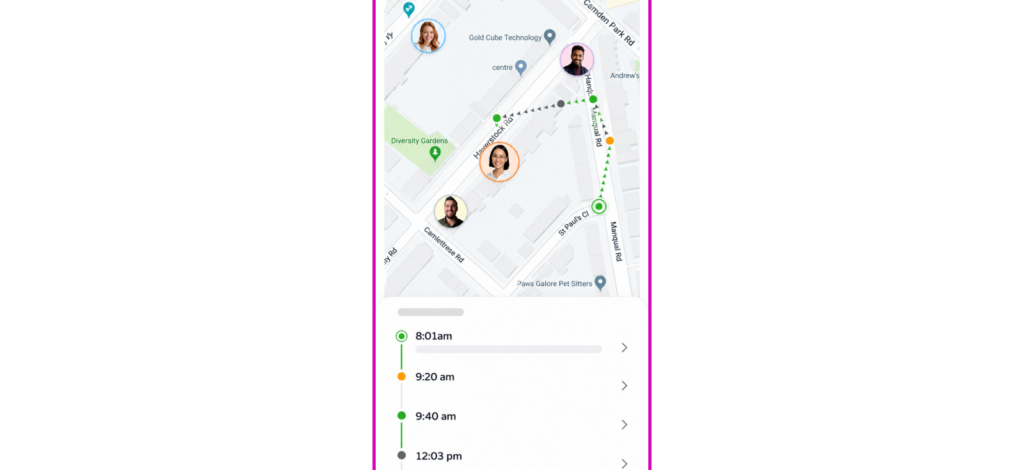
Jibble uses GPS and geofencing to restrict employee clock-ins to authorized locations, but its accuracy and enforcement have limitations.
We configured two job sites 2.4 kilometers apart, with geofence boundaries of 150 and 200 meters, and conducted 28 clock-in attempts.
Of the 18 attempts inside the correct geofence, 16 registered promptly, while two took 44 and 68 seconds to acquire GPS. All six attempts outside authorized locations were rejected.
However, four clock-ins made from one authorized job site were accepted against projects associated with the other site. This meant the geofence restricted where employees could clock in without consistently restricting which site’s projects they could record time against.
We also recorded three GPS readings that deviated by over 100 meters near buildings.
Persistent location permissions raised further concerns about battery consumption, while weak GPS signals could delay attendance verification.
Project Tracking
Jibble allows employees to assign working hours to projects and activities.
We created six projects and nine activities, then tested 24 time-allocation actions. Twenty-two were assigned correctly, while two required manual corrections because similarly named activities caused confusion.
Retrieving project totals was also less straightforward. Instead of finding a clear project-level summary, we had to filter timesheet entries and calculate the combined hours manually.
Overall, Jibble handled basic project-hour allocation reasonably well, but its confusing categorization and reporting limitations made detailed project tracking less convenient.
These records could still support labor-cost calculations, although determining project costs required additional manual work.
Payroll Calculations
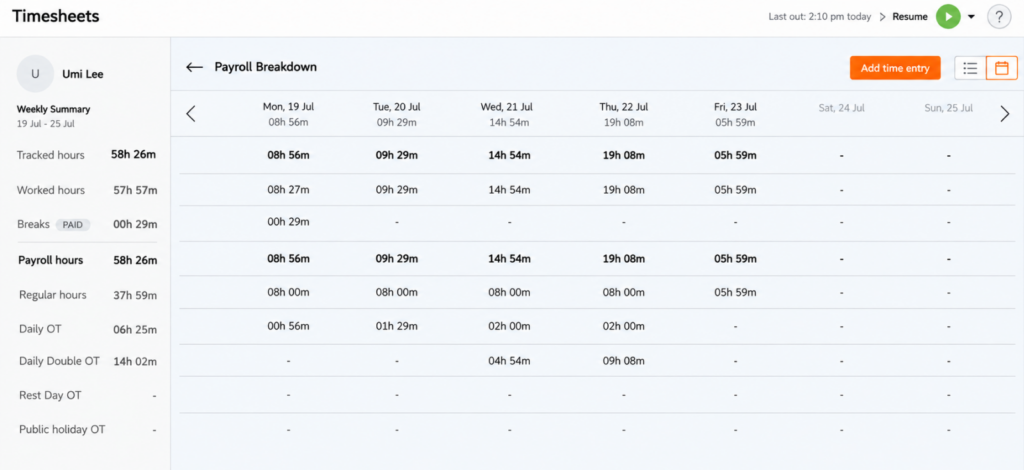
Jibble helps prepare payroll-ready timesheets, but calculating payable hours and processing employee payments remain separate workflows.
We tested four payroll reconciliation scenarios across three employee accounts, comparing regular hours, overtime, unpaid breaks, and manual adjustments against independently calculated totals.
Three matched our calculations, while the fourth overstated payable time by 30 minutes because an unpaid break was not deducted. We had to correct the entry manually before exporting the timesheet.
We also generated three Excel/CSV exports. Although they retained the necessary working-hour information, we could not process salaries, manage deductions, or track which employees had already been paid within Jibble.
Jibble integrations introduced further limitations. Although it supports Xero and QuickBooks, we kept facing unsuccessful QuickBooks connections despite extended troubleshooting.
Xero configuration also required administrator access, while API-based automation involved additional technical work and support delays.
Jibble Pros and Cons
Jibble Pros
- Generous free plan: Unlimited basic time tracking, timesheets, and essential attendance tools make Jibble accessible without a per-employee subscription.
- Multiple clock-in methods: Employees can record attendance through web, desktop, mobile, and shared kiosk interfaces.
- Straightforward initial setup: The first successful clock-in takes about 14 minutes, though configuring the full workspace takes longer.
- Centralized attendance oversight: Managers can review recorded hours, employee attendance, and timesheets, with role-based permissions controlling access.
- Offline time recording: Offline entries sync after reconnection, though certain functions aren’t available without internet access.
- Project tracking and exports: Jibble supports project-based time allocation and provides downloadable timesheet data for reporting and payroll preparation.
Jibble Cons
- Inconsistent time tracking: Unexpected timer stoppages, delayed clock-outs, and occasional recording discrepancies can affect timesheet accuracy.
- Restrictive scheduling and break rules: Limited support for mixed paid/unpaid breaks and advanced shift planning makes complex attendance policies difficult to manage.
- Unreliable facial verification: Incorrect identity matches, failed facial enrollment, and occasional buddy-punch acceptance can undermine the reliability of biometric attendance verification.
- Imprecise geofencing: GPS inaccuracies and weak project-to-site restrictions can compromise attendance verification, particularly in low-signal environments.
- Kiosk and mobile limitations: Complicated facial enrollment, repetitive kiosk navigation, inconsistent device performance, and battery-intensive location permissions can disrupt everyday clock-ins.
- Limited reporting and analysis: Fragmented reporting can require additional spreadsheet work and manual calculations.
- Incomplete payroll functionality: Jibble lacks native payroll processing and payment-status management.
Which Teams Will Benefit Most From Jibble, and Which Won’t?
Most Value For
- Small businesses: Small teams and startups needing basic clock-ins, clock-outs, and timesheets can benefit from Jibble’s free plan.
- Fixed-location workplaces: Retail stores, workshops, and offices with straightforward attendance procedures can use shared kiosks to record employee hours, provided verification settings are configured correctly.
- Attendance-focused teams: Businesses primarily concerned with tracking working hours, breaks, and overtime can use Jibble’s centralized timesheets and attendance reporting, with occasional manual reconciliation.
- Teams with predictable schedules: Organizations following standard working hours and simple break policies are less likely to encounter Jibble’s scheduling and attendance-rule limitations.
- Businesses using external payroll systems: Companies comfortable exporting timesheets, checking payable hours, and processing salaries through separate software can use Jibble as an attendance-data source.
Least Value For
- Remote and knowledge-work teams: Businesses requiring detailed employee productivity analysis, application usage insights, and comprehensive project profitability reporting may find Jibble’s monitoring and financial capabilities insufficient.
- Organizations with complex scheduling requirements: Teams managing rotating shifts, mixed paid/unpaid breaks, recurring rest periods, or complicated overtime policies may struggle with Jibble’s restrictive scheduling controls.
- Field teams requiring precise location verification: Construction, logistics, and remote-site operations may encounter GPS inaccuracies, delayed location detection, battery consumption, and weak project-to-geofence enforcement.
- Workplaces requiring strict identity verification: Organizations relying heavily on facial recognition to prevent buddy punching may find enrollment errors and inconsistent verification problematic.
- Businesses with complex payroll and HR requirements: Companies needing native payroll processing, detailed leave-accrual policies, advanced financial reporting, or dependable accounting integrations may require a more comprehensive platform.
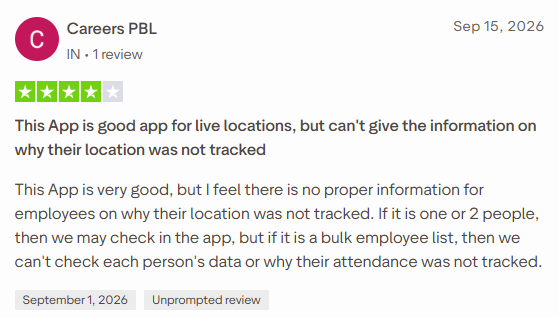
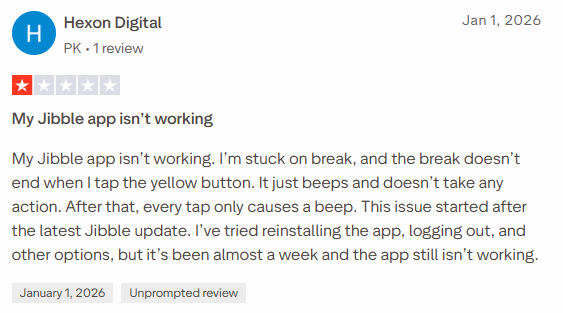
Jibble Reviews: What Are Its Users Saying?
When Jibble Is Not Enough for Your Workforce Management Needs
Jibble is primarily designed to record employee attendance, verify clock-ins, and prepare timesheets. However, its limitations in activity monitoring, project-cost analysis, financial reporting, and payroll management can become restrictive for businesses requiring more comprehensive workforce oversight.
This is where TimeBee, as an alternative, offers a more extensive approach, connecting time tracking with employee productivity, project performance, attendance, and financial management within one platform.
Its core capabilities include:
- Time tracking and management: Record working hours through project-based timers, manual entries, and CSV imports. TimeBee also supports idle-time detection, automatic timer controls, timesheet corrections, approval workflows, and entry validation to help maintain accurate records.
- Cross-platform compatibility: Track time through Windows, macOS, Linux, web browsers, the Chrome extension, Android, iOS, and shared kiosks. Supported offline tracking allows employees to continue recording time during connectivity interruptions and synchronize their records afterward.
- Employee activity monitoring: View activity indicators, configurable screenshots, idle periods, and tracked working sessions. These controls provide additional context about computer-based work.
- Website and app tracking: Examine application usage, visited websites, and time spent on specific activities. Managers can classify applications and websites as productive, unproductive, neutral, or unrated to analyze employee work patterns.
- Project-based tracking: Organize work into projects and tasks, examine time allocated to each, and monitor individual contributions.
- Costing and profitability: Automatically calculate project labor costs using employees’ tracked hours and hourly rates. TimeBee also provides project-cost breakdowns, client billing information, and profitability comparisons.
- Live workforce visibility: The live preview shows employees’ current working status, active sessions, and assigned projects or tasks.
- Attendance, leave, and kiosk management: Monitor attendance, late arrivals, early departures, and insufficient working hours. TimeBee also supports leave requests, approvals, configurable attendance policies, and shared-device kiosk clock-ins.
- Payroll, billing, and invoicing: Calculate employee pay using tracked hours, hourly rates, and adjustments. Businesses can also calculate client charges and auto-generate downloadable invoices from recorded work.
- Administrative controls and audit logs: Manage user permissions, team access, tracking settings, approvals, and monitoring policies. Audit logs provide records of important administrative changes, while timesheet validation helps identify conflicting or overlapping manual entries.
- Productivity tool integrations: TimeBee supports connections with tools such as Jira, Asana, Trello, ClickUp, GitHub, GitLab, Microsoft 365, and other workplace applications through its direct integrations and browser extension.
Jibble remains a reasonable choice for businesses that only need basic time and attendance tracking. However, TimeBee offers more depth for remote, hybrid, agency, and project-based teams that need to understand not only how many hours employees worked, but what they worked on.
Final Verdict: Should You Use Jibble?
Jibble is worth considering, but we do not recommend relying on it without reservations. Its 7.3/10 rating reflects a time-tracking platform that offers good value for basic attendance management but becomes less convincing when reliability and operational control are essential.
Our biggest concern is not the number of features Jibble provides; instead, it is how much confidence businesses can place in their records without repeatedly checking for errors.
We would recommend Jibble to smaller teams with straightforward requirements and the capacity to review attendance exceptions.
FAQs
What are the common complaints about Jibble?
Jibble reviews frequently highlight unreliable timekeeping, with users reporting unexpected timer stoppages and missing punches that require tedious manual corrections. Facial recognition is another concern, particularly when legitimate employees struggle to clock in or identities are incorrectly matched. Users also criticize the complexity of managing breaks and retrieving accurate reports. Customer support draws further complaints, especially when technical problems or failed integrations remain unresolved despite repeated attempts to seek assistance.
Is Jibble secure?
Yes, Jibble provides standard data security measures, including encryption for stored and transmitted information, optional two-factor authentication, and role-based access controls. However, businesses collecting employee location or biometric information should carefully configure access permissions and review data privacy policies.
Is Jibble a trustworthy time tracking app?
Jibble is a trustworthy time tracking app for basic attendance management, but its reliability is not consistent across all workflows. While routine clock-ins are generally straightforward, unexpected timer stoppages and occasional recording discrepancies can affect timesheet accuracy. Therefore, businesses should regularly review time entries and reconcile discrepancies before relying on Jibble for payroll calculations.
Does Jibble track employees when they are not working?
No, Jibble generally tracks employees only while they are clocked in. Live GPS tracking stops during breaks and after clock-out, even when background location permissions remain enabled. Similarly, desktop screenshots are captured only during active tracked sessions. However, employees should ensure they clock out correctly to prevent unintended tracking.
Can Jibble access your screen and camera?
Jibble can capture periodic screenshots through its desktop app when monitoring is enabled and permissions are granted. It also accesses the camera for facial recognition during clock-ins and clock-outs. However, screen monitoring captures still images rather than continuous video and stops during breaks or after clocking out.
Is Jibble completely free?
Yes, Jibble advertises a permanently free time-tracking offering for unlimited users. It includes basic employee time recording and attendance functionality without a mandatory per-user subscription. However, certain advanced controls and administrative capabilities depend on paid plans, so businesses should verify which features are included before configuring their workflows.
TimeBee: See the Work Behind Every Tracked Hour
Try It Now
Jacob Tyler
Member since July 2, 2026
Jacob Tyler
Member since July 2, 2026
Jacob Tyler is a B2B technology journalist specializing in workplace software, employee monitoring platforms, productivity technology, HR systems, data privacy, and the changing role of technology in modern organizations.
He holds an MSc in Information Systems from the University of Manchester. His professional qualifications include the CompTIA Data+ certification.
With more than 10 years of experience covering B2B software and digital transformation, Jacob focuses on translating complex product capabilities into clear guidance for business readers.
His work examines how software functions in practice, which operational problems it is designed to address, what data it collects, and what organizations should consider before implementation.
Through his writing, Jacob helps HR leaders, operations teams, founders, managers, and IT decision-makers understand workplace technology and make informed purchasing decisions.