

How to Monitor Employees Working From Home: Tools, Methods, and Best Practices
August 21, 2026 16 min readWhen employees work remotely, knowing whether work is progressing as expected is not always straightforward.
As a result, a missed deadline or a period of low activity can raise questions, but the first explanation is not always the right one.
Having managed remote HR operations myself, I have seen how easily surface-level signals can be misread. That is why effective monitoring depends on identifying which information is actually meaningful.
So, if you are figuring out how to monitor work-from-home employees, this guide will walk you through the steps, tools, methods, and practices that can help you understand remote work more clearly without making monitoring unnecessarily complicated.
How to Monitor Employees Working From Home: The 60-Second Breakdown
- Remote employee monitoring should evaluate employees’ work, organizational workflow, and activity patterns to identify any concerns.
- Start with a specific business problem and define what successful monitoring should improve.
- Use the least intrusive evidence that can reliably answer your question.
- Match monitoring tools to specific needs such as project delivery, time tracking, workload analysis, or employee feedback.
- Choose software that supports appropriate access, configuration, corrections, and data controls.
- Interpret activity patterns in context and investigate anomalies before making performance judgments.
- Effective monitoring should improve workflows and decision-making.
What Does Remote Employee Monitoring Mean?
Remote employee monitoring is the process of collecting and reviewing information about how employees perform and organize their work while working remotely.
Employers may collect this information through project management systems, time-tracking software, attendance records, communication platforms, and workforce analytics tools.
Depending on the purpose, the information may show:
- Completed assignments,
- Work deadlines and requirements met or not,
- Total time recorded against projects,
- Possible roadblocks,
- Schedule and attendance policy compliance,
- Application and website usage.
As a Director of People and Culture who has handled remote HR operations, I use this monitoring information in three distinct ways:
- Results data shows what the employee delivered.
- Operational data shows what happened while the work moved through the organization.
- Activity data shows selected digital behavior, such as application use, website classifications, keyboard or mouse activity, and periods marked as idle.
This distinction matters when learning how to monitor employees who work remotely because each type of information answers a different question.
For example, suppose an assignment is submitted three days late. In that case, the missed deadline is the result; a three-day wait for manager approval may be the operational reason for the delay, and the low keyboard activity during part of that period is an activity signal.
You should therefore review results, operational context, and activity data together before making a performance judgment.
Why You Should Monitor Remote Employee Productivity: 4 Key Benefits
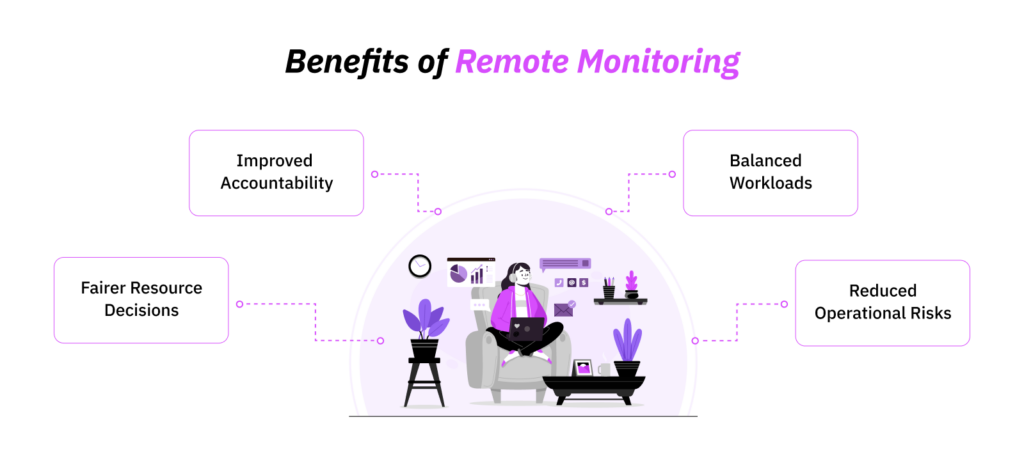
Monitoring remote employees is useful when you have a specific information gap involving deadlines, timesheets, workload distribution, workflow delays, security, or compliance.
I found that out when, in a 90-day review of 48 remote employees, I examined project records, time entries, attendance patterns, approval delays, and access events.
The review demonstrated four practical benefits of monitoring.
1. Improve Accountability and Goal Alignment
Remote accountability becomes difficult when assignments, deadline changes, and approval responsibilities remain scattered across messages and meetings.
During the review, I found that 18% of delayed assignments involved either an undocumented deadline change or no clearly recorded owner.
Once managers began documenting properly, overdue assignments declined by 24%.
This is how monitoring improves accountability by creating a shared record of what was assigned, when it was due, what changed, and who was responsible for the next step.
2. Identify Workload Imbalances
Monitoring can also reveal when a performance concern is actually a capacity or workflow problem.
In the same review, 31% of recorded after-hours work was connected to two recurring approval delays.
When I looked into it, it turned out that employees were waiting for decisions during their normal schedules and returning later to complete the work once approval arrived.
However, after I reassigned approval ownership, after-hours work declined by 22% over six weeks.
You can use the same approach to identify repeated overtime, overloaded employees, unused capacity, approval bottlenecks, informal assignments, and time-zone coverage gaps.
3. Support Fairer Resource Decisions
Employers often ask how to track remote employees because they need better evidence for decisions about staffing, deadlines, budgets, training, and employee support.
It was through monitoring that I also found out that one team was operating at 118% of its planned capacity, while another had approximately 16% available capacity, which gave me an opportunity to reallocate suitable work.
This type of evidence helps you determine whether a team is understaffed, a project deadline is unrealistic, work needs to be reassigned, or an employee needs training.
4. Reduce Security and Operational Risks
The review also identified 14 unusual account-access and file-transfer events. After investigation, I found that 10 were legitimate, three resulted from process errors, and one required formal security action.
Therefore, when used carefully, monitoring can help you detect missing time records, unauthorized software, unusual account access, and potential mishandling of confidential information.
How to Track Remote Employees Effectively and Ethically
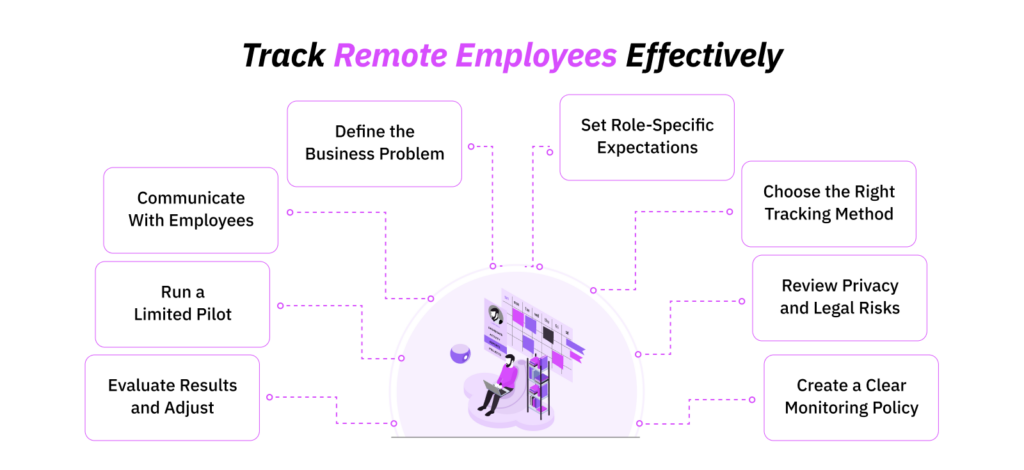
A responsible monitoring system should help you answer a defined operational question.
That is why, when I introduce monitoring for a remote team, I treat it as an HR operations project rather than a software rollout.
To do so, I define the business problem, agree on valid performance measures, review privacy risks, train managers, test the system, and decide whether the information is useful enough to retain.
The following eight steps explain how to monitor employees working from home while keeping the process accurate and useful.
Step 1: Define the Business Problem and Desired Outcome
Start with the decision you need to make. For example, “We need more visibility” is not a sufficient objective.
A valid monitoring objective may involve:
- Overdue client work,
- Inaccurate timesheets,
- Unplanned overtime,
- Missed coverage hours,
- Unassigned tasks,
- Recurring project overruns.
Therefore, before beginning, I always ask managers to describe the issue in operational terms. For example: “We need to understand why 23% of client projects exceeded their approved hours during the last quarter.”
That statement gives me something specific to investigate that I can review through project estimates, time entries, scope changes, approval delays, and task ownership.
Not only that, but I also set a measurable outcome before monitoring begins since it helps me determine whether monitoring solved the problem.
Step 2: Set Clear, Role-Specific Expectations
You also cannot assess remote productivity fairly until you have defined what successful performance looks like.
Therefore, before reviewing monitoring data, I always document what my expectations are for each employee, which include:
- Core deliverables,
- Quality requirements,
- Expected turnaround times,
- Schedule requirements,
- Project ownership,
- Approval responsibilities,
- Communication expectations,
- Time-recording requirements.
Now remember that these expectations will change as per an employee’s role.
Step 3: Select the Most Appropriate Tracking Method
Once the problem and expectations are clear, select the least intrusive source of information that can answer your specific question.
Personally, when it comes to choosing the right method, I use a sequence called the Remote Operations Evidence Ladder:
- Outcome evidence: Was the agreed work completed to the required standard?
- Workflow evidence: Where did the work move, stall, or return for revision?
- Time evidence: How much recorded effort did the work require?
- Activity evidence: What digital behavior may help explain the pattern?
- Content-level evidence: Is there a sufficiently serious reason to review screenshots, detailed URLs, or similar records?
Then, I move down the ladder only when the earlier evidence does not provide a reliable answer.
Moreover, it is also significant that you match each method to a specific need. For example, I use:
- Project management software for project ownership, deadlines, dependencies, and approval delays.
- Time tracking for payroll, billing, attendance, estimates, or capacity planning.
- Workforce analytics for recurring workload and activity patterns.
- Employee updates and one-to-one meetings to understand context.
Step 4: Conduct a Privacy, Legal, and Risk Review
Before implementation, you must also identify:
- Where employees work;
- Which devices they use;
- When monitoring will occur;
- What information the software can capture.
This matters because a remote workforce may include employees working across different jurisdictions, using different devices, following varied schedules, and performing roles with different privacy and security risks.
Each of these factors can change what is appropriate to collect and how the information should be handled.
For example, a screenshot taken during working hours may capture a private message, while website history may include unrelated browsing when an employee uses a personal device.
I therefore consider these factors before approving any monitoring tool.
To add to the considerations, legal requirements also vary according to the employee’s location, device ownership, monitoring technology, and the type of information collected. For that reason, when selecting an employee monitoring tool, I involve qualified legal counsel to assess the requirements that apply to the workforce.
Step 5: Create a Written Remote Monitoring Policy
A monitoring policy should allow an employee to understand the system without having to infer its rules from a dashboard.
When deciding how to monitor employees who work from home, I advise organizations to document:
- Why monitoring is being introduced;
- Which roles, employees, devices, and systems are covered;
- What information will be collected;
- What information will not be collected;
- When monitoring begins and ends;
- How breaks and flexible schedules are handled;
- Whether employees can pause or correct tracking;
- Who can access individual records;
- How long information is retained;
- How managers may use the information;
- How managers may not use the information;
- How employees can view or challenge their records;
- What happens when tool data conflicts with an employee’s explanation;
- Who owns the policy;
- When the policy will be reviewed.
Additionally, it is equally important that the questions are answered using specific language.
For example: “Application activity may be reviewed” does not tell an employee what is included within this data.
Therefore, a clearer policy should state something along these lines: “Managers can review the total time recorded in approved work applications. However, detailed message content and personal browser tabs are not collected.”
Step 6: Communicate the Process to Employees
Another practice that is highly discouraged is introducing monitoring through an installation notice or a policy attachment.
Before you implement monitoring, employees need to understand what the system will do in their actual working day.
Therefore, you should remain prepared for some of the commonly asked questions that I have come across during remote monitoring rollouts:
- What happens if my internet connection drops?
- Can I correct time assigned to the wrong project?
- Are private browser tabs visible?
- Who can see screenshots?
- Does idle time affect my performance rating?
- How are breaks handled?
- How does the system treat different time zones?
- Can my manager view activity outside my agreed schedule?
Once the employees are well-informed, you should then focus on training managers.
To put its significance into perspective, before a rollout, I had asked managers to review the same set of anonymized activity records before training, and it turned out that their conclusions differed in 58% of cases.
However, after proper training on role context, workflow evidence, and employee explanations, disagreement fell to 17%.
That finding reinforced an important lesson, i.e., a monitoring system does not create consistency if managers do not have shared interpretation rules.
Step 7: Run a Limited Pilot
One last step before you begin monitoring is to first test the chosen tool with one defined remote team and use case for a fixed review period.
Throughout the pilot, you should collect regular feedback from both managers and employees. You should also document inaccurate records, technical issues, disputed alerts, and any changes made to the tool’s configuration before completing a final review.
This controlled approach matters because a company-wide rollout can generate large amounts of data without showing which information is genuinely useful or whether the tool has been configured correctly.
For example, when I conducted a 30-day pilot involving 25 remote employees, the system generated 42 activity exceptions during that period.
After managers examined the records with the employees involved, we found that 64% required additional context, 24% resulted from incorrect classifications or technical issues, and only 12% represented a genuine policy or performance concern.
Overall, the findings helped us correct the system before expanding its use.
Step 8: Evaluate Performance and Workflow Findings
Once the pilot ends, return to the business problem you defined at the beginning and determine whether the information collected during the pilot helped you make a better operational decision or not.
Remember, along with the benefits, you must also assess the administrative and employee-relations costs.
For example, a system may reduce missing time entries while requiring managers to spend several additional hours each week reviewing alerts that rarely lead to action.
When I came across a similar instance where, in one pilot, payroll corrections had declined from 14% to 6%, but managers were spending an additional 5.5 hours per week reviewing individual activity alerts, I took action accordingly.
Based on those findings, I had simply retained project and time reporting and removed the low-value activity alerts, which reduced manager review time by 63%.
All in all, as the last step, you should make a final decision:
- Continue monitoring with the current configuration,
- Retain only the information that proved useful,
- Modify the classifications, rules, access controls, or retention period,
- Extend the pilot because the findings remain inconclusive,
- Discontinue monitoring because it did not improve the original outcome.
TimeBee: Remote Employee Monitoring Simplified
Learn More
How to Monitor Remote Employees With Different Tools and Methods
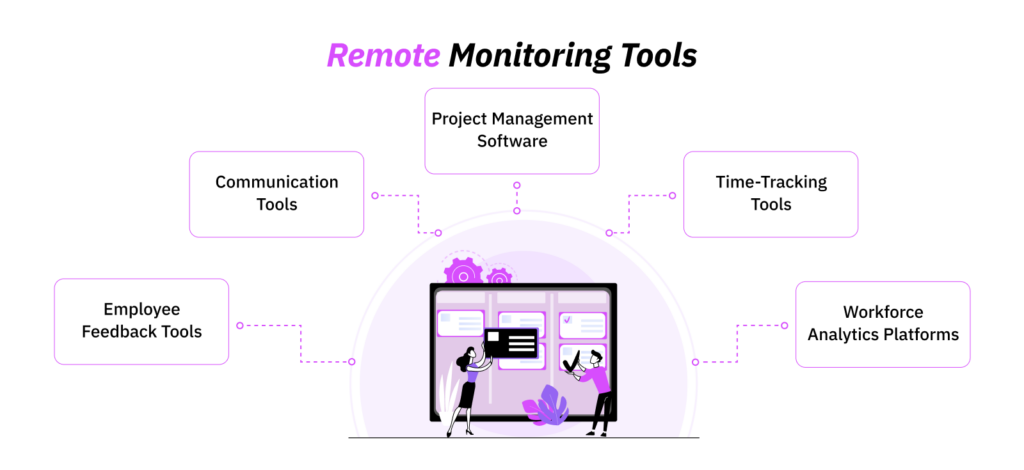
No single platform can tell you everything about remote performance. Therefore, you should select the method according to the problem.
| Tool | Best used for | Useful information | Main limitation |
| Project management software | Delivery and workflow visibility | Ownership, milestones, blocked tasks, approval delays, and overdue work | Task counts do not reflect complexity or quality |
| Time-tracking software | Payroll, billing, attendance, and capacity planning | Time by project, billable hours, manual corrections, and after-hours work | Hours do not prove productivity or concentration |
| Workforce analytics platforms | Identifying sustained activity and workload patterns | Application usage, idle classifications, attendance, and activity trends | Classifications may be inaccurate or inappropriate for the role |
| Communication tools | Reviewing decisions, handoffs, and coordination problems | Unresolved requests, documented actions, and approval delays | Message volume and online status are weak performance measures |
| Employee feedback tools | Understanding workload, clarity, support, and trust | Role clarity, workload confidence, tool friction, and employee context | Feedback may be incomplete when employees do not feel safe responding |
1. Project Management Software
Project management software tracks how work moves from assignment to completion.
Within the software, managers create tasks, assign owners, set deadlines, record dependencies, and update each item as it moves forward.
This makes the software most useful when your main concern is delivery visibility.
Overall, the most useful measures include completion rate, cycle time, approval time, overdue work, blocked tasks, and revision frequency.
However, an important thing to note is that task volume should not be treated as a productivity score.
That is because one employee may complete 20 routine assignments, while another spends the same period delivering one complex piece of work with greater business value.
2. Time-Tracking Tools
Time-tracking tools record how much time employees assign to projects, tasks, and clients.
Depending on the system, employees may use a live timer or a timesheet to submit their work hours for manager approval.
Use-case-wise, these tools are most appropriate when you need accurate records for payroll, client billing, project costing, attendance, overtime, staffing, or capacity planning.
Moreover, they can also show project overruns and workload imbalances.
For instance, if a client project repeatedly exceeds its approved hours, time records can help you determine whether the original estimate was unrealistic, the scope changed, approvals were delayed, or employees recorded time against the wrong project.
3. Workforce Analytics Platforms
Workforce analytics platforms combine information from time records, attendance systems, applications, websites, and digital activity into centralized dashboards.
They are designed to show patterns across an employee or team rather than simply recording individual tasks.
Therefore, when determining how to monitor remote workers, these platforms are most useful when you need to investigate recurring patterns that cannot be understood through project and time data alone.
However, workforce analytics require careful configuration. That is because an application labeled “unproductive” may be productive for one employee and irrelevant to another.
I therefore treat productivity labels and activity percentages as prompts for investigation.
4. Communication and Collaboration Tools
Communication and collaboration tools record conversations, shared files, meeting actions, approvals, comments, and handoffs. Although they are not primarily monitoring platforms, their records can provide valuable operational context.
When used right, these tools are most useful for identifying unclear decisions, unanswered requests, weak handoffs, and poor access to manager support.
For example, if an employee misses a deadline, the communication record may show that they requested clarification several times but did not receive a response.
In another case, it may confirm that the employee received clear instructions but failed to act within the agreed period.
5. Employee Feedback and Survey Tools
Employee feedback tools collect information that digital records cannot explain.
Most of the time, these include pulse surveys, structured check-ins, workload assessments, self-reports, and questionnaires about manager support or the monitoring process itself.
All in all, they are most useful when the available data shows a pattern but not its cause.
Such as, time records can show repeated after-hours work, but employee feedback may reveal that approvals arrive late because of time-zone differences.
In my experience, the best approach is to implement feedback tools alongside monitoring rather than waiting until employees formally complain.
How to Choose the Right Remote Employee Monitoring Software
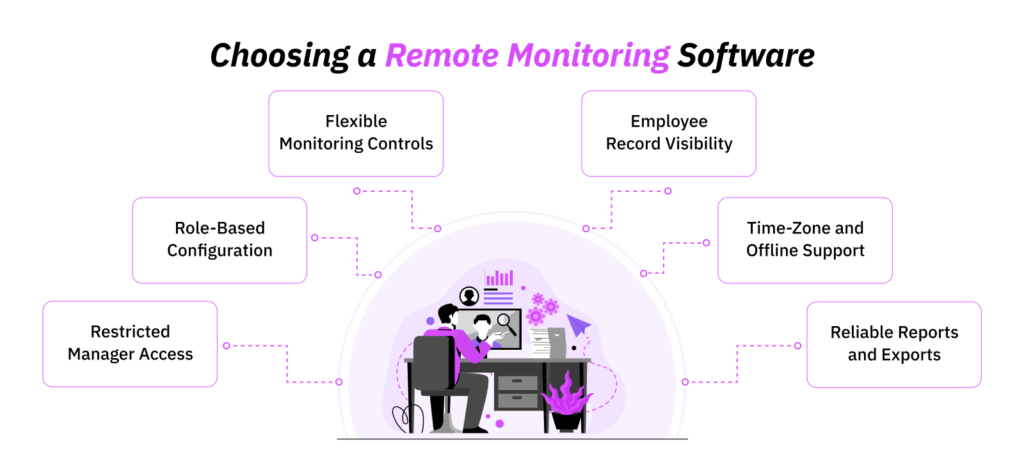
Before selecting any tool for a team, I confirm whether I can:
- Disable unnecessary monitoring,
- Adjust screenshot settings,
- Configure productivity classifications by role,
- Restrict manager access, and
- Set appropriate retention periods.
Not only that, but I also make sure that the concerned employees can view their records and correct any inaccurate entries.
Lastly, from an operational perspective, I also check whether the platform supports multiple time zones, offline tracking, project and task allocation, manual time approvals, audit logs, and reliable data exports.
Ultimately, I would say the right software is a platform that fits your operational process, gives usable information, and allows you to disable data collection you cannot justify.
How to Track Employees Working From Home Using TimeBee
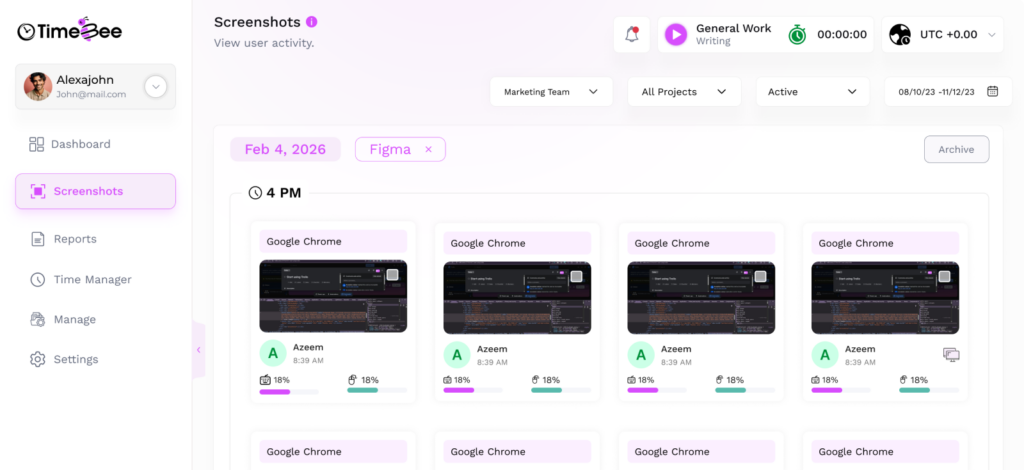
In one remote operation, I used TimeBee to bring time tracking, attendance, project records, productivity data, and workforce reporting into the same workflow.
What I found most useful about the tool was how the information could follow the employee’s work from the moment time was recorded through to manager review, payroll, client billing, and project analysis.
Employees could begin their workday by starting a timer against an assigned project and tasks, which gave us a clearer record of where working hours were actually being spent.
However, remote work is rarely that tidy. Of course, people tend to forget to start timers or need to correct an entry later. In those cases, manual entries and CSV imports gave the employees and the administration a way to amend the record rather than leaving inaccurate time in the system.
Managers could then review start and end times, total hours, projects, tasks, billable status, and approval information before the records moved further into the workflow.
That became particularly useful for payroll and billing. Not only that, but that same project data also helped connect recorded effort with project costs and profitability, which gave managers a better view of whether the amount of time going into certain work still made financial sense.
I also found the website and application classifications useful for adding context to the hours recorded. Since TimeBee can categorize usage as productive, unproductive, neutral, or unrated, I was able to adjust those classifications at different organizational levels.
However, I would never treat those classifications as a final productivity judgment. If an employee recorded eight hours, I would look at which projects those hours belonged to, whether the work was completed, whether attendance matched expectations, and whether the applications being used made sense for the role.
The same applies to screenshots and keyboard or mouse activity measures. TimeBee supports them, but they can be disabled. In my case, I would only use more detailed monitoring if project time, task allocation, attendance, and application-level information could not answer the business question first.
Other operational features like offline tracking, scheduled notifications, role-based access, audit logs, and configurable data retention settings also helped keep the process manageable.
The main drawback, however, was that TimeBee can require some upfront configuration before the data becomes genuinely useful.
Therefore, if you use TimeBee to monitor remote employee productivity, I recommend spending more time configuring the workflow at the beginning.
How to Monitor Employees Who Work Remotely: 8 Best Practices
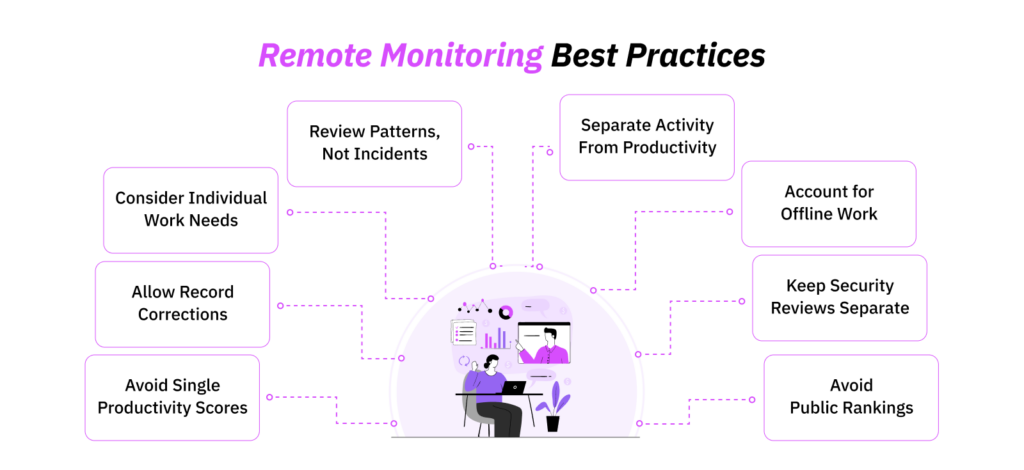
The following best practices explain how to properly track employees working remotely.
| Monitoring signal | Common managerial misreading | Questions to investigate first |
| Low keyboard or mouse activity | The employee was not working | Was the employee on calls, reading, planning, reviewing documents, or using an untracked tool? |
| High activity percentage | The employee was highly productive | What work was completed, was it accurate, and did the activity produce a useful result? |
| Repeated after-hours work | The employee has poor time-management skills | Were approvals delayed, workloads excessive, or time-zone expectations unclear? |
| Frequent application switching | The employee lacks focus | Does the role require multiple systems, or is the workflow creating unnecessary interruptions? |
| “Unproductive” website use | The employee misused work time | Is the site required for research, communication, training, or a specific client? |
| Missed time entry | The employee is concealing time | Were project codes unclear, was the system unavailable, or was the entry awaiting approval? |
| Slow response time | The employee was disengaged | Was the employee in focused work, a meeting, another time zone, or an approved absence? |
| Security alert | The employee committed misconduct | Was the action authorized, accidental, technically generated, or genuinely suspicious? |
1. Examine Patterns Rather Than Isolated Incidents
A single inactive period or unusual application record rarely proves anything on its own.
Instead, managers should look for sustained patterns across a reasonable period and compare them with deliverables, workload, schedule, quality, technical issues, and the employee’s explanation.
2. Do Not Equate Digital Activity With Productivity
Keyboard input, mouse movement, application switching, and screen time show device interaction, but they do not establish the quality of the work.
For example, a highly experienced employee may complete an assignment efficiently, and another may generate constant activity because they are switching between unclear priorities.
Therefore, you should only use activity data to identify questions, not to supply the final answer.
3. Account for Legitimate Offline Work
Remote work may include calls, planning, brainstorming, reading, training, reviewing documents, taking notes, or thinking through a difficult decision. And truth be told, these activities can appear as idle time.
So, managers must understand which parts of a role may happen away from the keyboard and account for them when interpreting data.
4. Keep Security Signals Separate
When considering how to monitor your employees working from home, keep security review separate from performance management.
Simply put, an unusual login or file transfer may require investigation, but it does not automatically establish misconduct.
The appropriate response, therefore, is to verify what happened, involve the relevant security team, and document the findings before the information influences any employment decision.
5. Avoid Public Rankings and Productivity Leaderboards
Public rankings encourage employees to optimize the metric rather than the work. As a result, employees may keep timers running, avoid reasonable breaks, choose easier tasks, or generate visible activity simply to protect their position on the leaderboard.
To avoid this, I recommend reviewing monitoring data privately and using it as supporting context.
6. Consider Individual Working Needs
Disabilities, assistive technology, flexible schedules, caregiving responsibilities, approved accommodations, and different work methods can change how digital activity appears.
A standardized activity threshold may therefore create unequal outcomes. So, before you act on monitoring data, review whether the metric is valid for the role and consistent with the employee’s approved working arrangement.
7. Allow Employees to Challenge Inaccurate Information
Employees should be able to see relevant records, explain anomalies, and request corrections before monitoring data affects a significant decision.
For example, during a quarterly classification review, employees challenged 37 application ratings. And, after role and manager review, 18% of time previously labeled “unproductive” was reclassified as legitimate work activity.
8. Do Not Rely on a Single Composite Productivity Score
A single productivity score can reduce several behaviors into one number, often without making it clear how each factor was weighted.
As a result, it can create an appearance of objectivity while hiding important differences in workload, role requirements, work quality, and context.
That is why you should never use a single productivity score as the sole basis for pay, promotion, work allocation, performance warnings, disciplinary action, or termination.
Conclusion
Learning how to monitor the productivity of remote workers ultimately comes down to operational judgment.
Therefore, a reliable approach starts with defining a clear business problem and then using the Remote Operations Evidence Ladder to identify the least intrusive information needed to address it.
From there, the data should support better problem-solving and workflow improvements rather than closer observation of employees.
For that approach to work, however, managers need proper training on how to interpret monitoring data in context. Otherwise, employees may feel that they are repeatedly forced to explain legitimate work patterns that the system cannot fully capture.
FAQs
Is it legal to monitor remote employees?
Remote employee monitoring may be legal, but the answer depends on the employee’s location, the device used, the information collected, the monitoring method, and consent rules. Therefore, employers should obtain qualified legal advice before implementing monitoring across a distributed workforce.
How can you monitor remote workers’ productivity without screenshots?
When deciding how to track employees working from home without screenshots, begin with outcome, workflow, and time evidence. These can include completed work, quality, deadlines, project milestones, approved timesheets, customer outcomes, workload, documented progress, time by project, employee updates, and manager check-ins.
What are common remote employee monitoring mistakes?
Common remote employee monitoring mistakes usually come from collecting data without a clear purpose. Moreover, when employers apply the same metrics across different roles, overlook legitimate offline work, and continue monitoring beyond agreed working hours, problems can arise.
Should employees have access to monitoring data?
Employees should generally be able to access information that materially affects their attendance, time records, pay, workload, and performance assessment. Moreover, when employees have access to their data, they can identify inaccurate times and fix errors before they continue into payroll or billing.
When do businesses need to monitor their remote employees?
Monitoring is most defensible when you have a specific information gap and need to address operational concerns that arise from a lack of visibility. However, if the completed work, quality measures, project records, and standups offer enough content, there is no need to monitor remote employees.
Understand What Your Work-From-Home Employees Are Up To with TimeBee
Try Out TimeBee
Patricia Adams
Member since July 28, 2026
Patricia Adams
Member since July 28, 2026
Patricia Adams is the Director of People and Culture, who focuses on employee experience, people operations, performance management, and the responsible use of workforce technology.
She holds an M.S. in Industrial/Organizational (I/O) Psychology from Florida Institute of Technology. She is also a Certified Information Privacy Manager through the International Association of Privacy Professionals.
With more than 5 years of experience, Patricia examines how workplace systems affect both organizational performance and the people being measured.
Therefore, her work centers on helping organizations establish practical policies that support accountability without disregarding employee privacy and professional autonomy.