

Toggl Track Review: What We Found After Testing It from Every Angle
By Jacob Tyler
August 13, 2026 15 min readCompanies invest in time-tracking software because manually examining every employee’s workday is no longer feasible or scalable. Even with an app, managers still have several factors to review. This is why today’s time trackers offer features beyond time tracking that help businesses monitor everything from employee capacity to project profitability.
Like many of the time trackers, Toggl Track also positions itself as a solution to these demands. It promises effortless time capture, accurate records, cross-platform access, flexible integrations, actionable reports, and greater visibility into productivity and profitability.
It also promotes a privacy-focused approach that avoids screenshots and invasive employee surveillance. These claims make the platform appealing, but do they hold up in everyday use?
We structured this Toggl Track review around that question and tested the product from every relevant angle. Let’s dive in to understand Toggl Track’s ins and outs.
Overview: What You Need to Know About Toggl Track
| Category | Toggl Track Specification |
| Overall Rating | 7.9/10 |
| Core Purpose | Time tracking, reporting, billing, invoicing, and profitability analysis |
| Compatibility | Web, Windows, macOS, Android, iOS, Chrome, Firefox, and Edge |
| Setup Complexity | Easy individually; moderate for teams and advanced controls |
| Free Trial | 30-day Premium trial without a credit card |
| Free Plan | Up to five users with essential tracking and reports |
| Pricing | Starter $9; Premium $14 then $18; Enterprise custom |
| Tracking Methods | Timer, manual entries, timesheets, calendar, Timeline, and offline tracking |
| Report Exports | PDF on Free; CSV and Excel on paid plans |
| Cloud Syncing | Online synchronization with offline desktop storage |
| Strengths | Simple timer, strong reports, approvals, integrations, and offline tracking |
| Limitations | Project-based client tracking, platform gaps, and paid advanced features |
How We Tested Toggl Track App: Our Hands-On Review Methodology
We evaluated the Toggl Track app through a controlled enterprise model. The test scenario covered a one-month operating cycle. Our review team included QA specialists, developers, IT professionals, cybersecurity specialists, product analysts, project managers, and HR technology consultants.
We created a professional-services workspace with 20 users, six clients, and 18 active projects. The model covered freelance billing, agency reporting, project budgeting, employee timesheets, offline work, approvals, and cross-device workflows.
We based the assessment on Toggl Track’s Premium feature set because it includes advanced reporting and team-management capabilities; hence, we can analyze the app more carefully.
We selected the following scoring criteria because they reflect a broad range of business requirements. Each category has a different weight based on its importance to the platform’s overall performance.
Time Tracking and Cross-Platform Reliability (25%)
We evaluated every major time-tracking feature Toggl Track offers, from one-click timers and manual entries to offline tracking and device synchronization. This metric was given the highest weight because tracking reliability is the foundation of the entire product. We therefore examined whether time records were accurate under realistic working conditions.
Reporting, Analytics, and Invoicing (25%)
This metric received a 25% weight because the reports generated by a time tracker can help businesses improve workflows and strengthen their bottom line.
We reviewed every report Toggl Track produced, from productivity summaries to profitability analysis. We then assessed how useful each report was for strategic planning and whether the data provided enough context to support decisions on its own.
Team Management and Integrations (20%)
This metric received a 20% weight because time-tracking software must support both individual users and wider team workflows.
We reviewed access control systems and audit capabilities. Moreover, we assessed whether Toggl Track integrations could reduce manual work and support smoother coordination across different business tools.
Ease of Use and Customer Support (20%)
This metric received a 20% weight because even an advanced time tracker loses value when employees or managers struggle to use it.
We evaluated account setup, the Toggl Track login process, and administrative controls. Further, we reviewed the available support channels and help documentation to assess whether users could resolve issues efficiently.
Privacy and Security (10%)
This metric received a 10% weight because time-tracking platforms collect sensitive information about employees and business operations.
We examined what data Toggl Track records and how private activity becomes a shared time entry. Other than that, we reviewed authentication options and security certifications to understand where the app stands on laws and certifications.
What is Toggl Track?
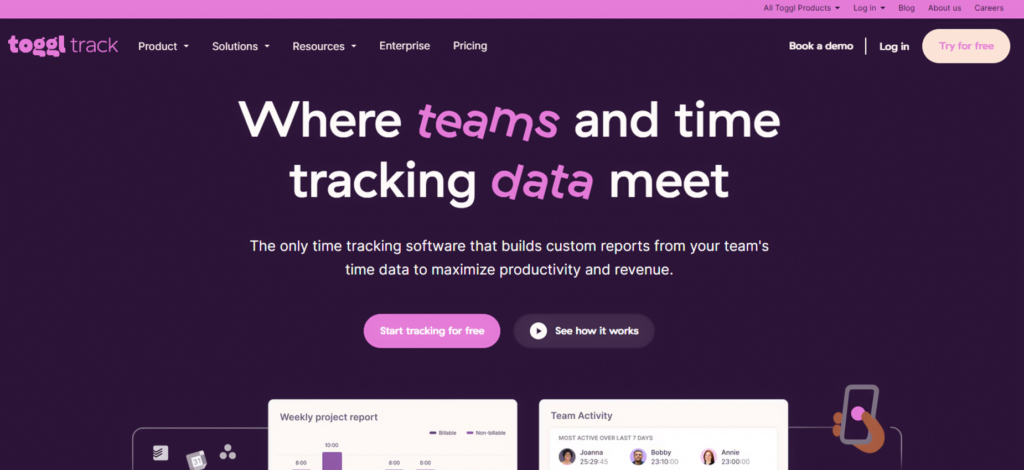
Toggl Track is a cloud-based time-tracking and workforce analytics platform created in 2006 by Alari Aho and Krister Haav. It began as an internal tool for their Estonian software consultancy, where the team struggled to determine how long projects took and whether clients were being charged accurately. The founders later developed it into a commercial product for businesses facing the same problem.
Today, the Toggl Track app covers manual and automatic time tracking, project organization, billable rates, invoices, timesheets, approvals, workload analysis, and profitability reporting. It works across the web and also supports browser extensions. Toggl Track is best known for its simple timer and privacy-focused approach.
Companies usually consider Toggl Track because it combines easy time capture with reports that explain where working hours and project budgets are going. It is best suited to freelancers, agencies, consultancies, professional-services firms, and distributed teams that need reliable time data without screenshots or continuous employee surveillance.
How Does Toggl Track Work?
Toggl Track looks simple because the timer is simple. Behind that timer, however, is a structured system that connects recorded hours with added features and reports. The quality of the final report therefore depends on how accurately users categorize their time from the beginning.
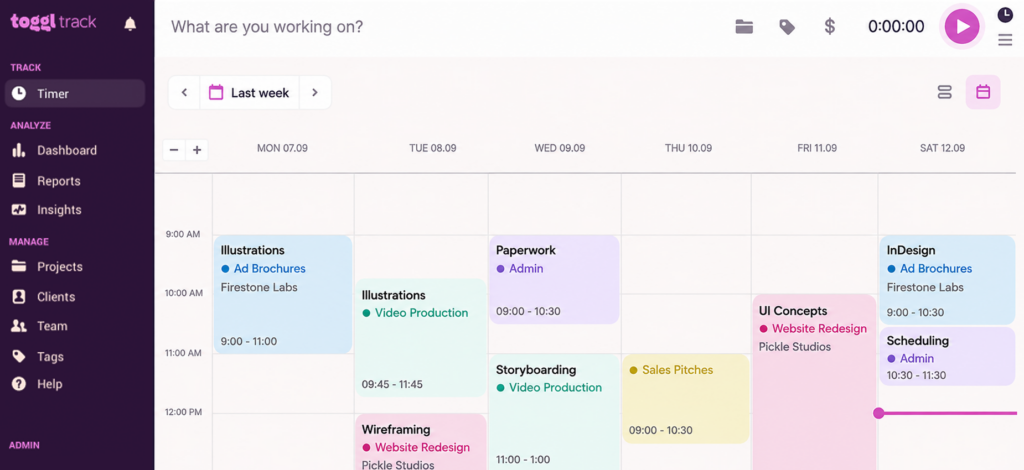
After the Toggl Track login, users can start a live timer or record completed work manually, even through calendar or weekly timesheet views. Each entry can contain attributes that classify the entry further.
Toggl Track does not have a conventional pause button. Instead, users stop a timer and continue the previous entry when they resume the same activity.
The data structure follows a clear hierarchy. An organization can contain workspaces, which further branch out to projects and clients.
Clients sit above projects, and paid users can divide projects into smaller tasks. This structure allows managers to compare time across different levels of the business.
However, Toggl Track does not allow users to assign time directly to a client. Every client-related entry must first connect to a project.
This works well for agencies handling several assignments for one client, but it adds an unnecessary layer for freelancers who provide one ongoing service. Toggl itself suggests using client names as project names when the additional hierarchy is not required.
Toggl Track Download and Compatibility
Toggl Track is available across the main environments used by office-based and remote teams. However, the applications do not offer identical capabilities. The web app is the control center, while the desktop, mobile, and browser versions focus more heavily on time capture.
- Web app: Provides the broadest functionality. Users can manage workspaces and administrative settings through a supported browser.
- Windows: The native Toggl Track download requires Windows 10 version 1903 or later. It supports live and manual tracking.
- macOS: The native app supports offline tracking and synchronizes locally recorded entries when the connection returns. It also includes Timeline activity recording, which helps users reconstruct periods they forgot to track.
- iOS and Android: The mobile apps support basic reports and on-the-go project creation. However, they function mainly as companion apps. Advanced reports and full data-structure management still require the web platform. Mobile reports are also limited to the user’s own tracked time.
- Browser extensions: The Toggl Track extension also works with Edge, while a separate version supports Firefox. The extension places timer buttons inside supported web tools and allows users to track work without repeatedly returning to Toggl Track.
- Apple Watch: The watchOS app allows users to start and stop timers from their wrist. It is convenient for quick capture, but it does not replace the broader controls available through the web or mobile apps.
Toggl Track does not currently promote a native Linux application on its official desktop page. Linux users can still access the web app through recent versions of Chrome, Firefox, Safari, Opera, or Chromium-based Edge where applicable.
Overall, Toggl Track offers enough platform coverage for hybrid teams. The limitation is not availability but feature parity. Employees can record time from almost anywhere, while managers will still need the web app for advanced administration and analysis.
Toggl Track Integrations & Setup
Toggl Track setup is easy for individuals but requires more planning for teams. Users can create an account with an email address or use Google or Apple authentication. Premium and Enterprise organizations can also configure single sign-on.
Once the account is active, administrators must create the workspace structure by choosing the required categories such as permissions and tags.
The most important setup decision is how the organization categorizes work. Businesses should determine whether clients represent external customers or business units. Projects must then represent the work performed for those clients. Tasks can add another level, but they are a paid feature and can only be created by administrators or project managers.
A weak structure creates weak reports. If users create duplicate projects or vague time-entry descriptions, managers may struggle to compare teams or calculate profitability. Toggl Track provides flexible controls, but the administrator must establish naming rules and required fields before inviting a wider team.
Toggl Track advertises connections with more than 100 tools. However, that number combines several types of Toggl Track integrations. Some provide native synchronization, while others only place a timer button inside another application. Toggl also supports automation platforms and an API for organizations that need custom workflows.
The difference is important. Jira, Asana, Salesforce, QuickBooks Online, and Slack offer dedicated connection options with different levels of functionality. For example, Salesforce can synchronize selected records into Toggl Track, while Slack supports commands for starting timers and recording entries.
The Toggl Track Chrome extension is useful when the goal is simply to start tracking from another platform.
Toggl Track Interface
Toggl Track places the timer at the center of its interface, which makes the first interaction simple. Users can start tracking with only a description, then add other related information later.
The interface becomes more complex for administrators, who must manage workspaces and report settings. Mobile users can track time and create basic records, but full administration and workspace reporting still require the web app.
Our overall assessment is that Toggl Track succeeds at making the daily timer easy without reducing the product to a basic stopwatch. However, the simplicity is concentrated on the employee side. Managers should expect a more involved setup process if they want consistent reports and reliable profitability data.
Toggl Track Pricing
Toggl Track pricing on the annual view is structured as follows:
- Free: $0. Toggl Track free plan features include time tracking across web, desktop, and mobile, productivity reports, calendar connections, and browser-extension access to 100-plus tools.
- Starter: $9 per license per month. Adds billable rates, project estimates, tasks, team reporting, and other management controls.
- Premium: $14 per license per month for the first annual term, then $18 at renewal. Adds approvals, profitability analysis, fixed-fee projects, scheduled reports, stronger data controls, Jira, Salesforce, and SSO.
- Enterprise: Custom pricing with onboarding, tailored setup, a customer success manager, and priority support.
One caution: the current pricing page says the Toggl Track free plan supports a “limited number of users” without publishing the exact cap. Other Toggl pages still reference up to five users. Confirm the active limit during signup before standardizing a team workflow.
TimeBee: Improve Accountability Without Disrupting Employee Focus
Discover More
Toggl Track Features: How They Performed During Testing
We tested Toggl Track’s features through the daily workflows created for our model enterprise.
The timer is the product’s strongest area; even in Toggl Track reviews online, most customers have vouched for it. Toggl Track also performed well when we used recorded time for reports and project analysis. However, some workflows required more setup than the interface initially suggested.
Here is how it worked, feature by feature
Time Tracking and Activity Capture
Time Entry
We tested all timer options one by one. The one-click timer performed well because users could begin tracking with only a description. Manual entry was equally useful for employees who completed their timesheets later.
However, correcting forgotten or inaccurate entries was less direct than starting a new timer. Users could edit the records, but longer corrections required more movement between views.
Automatic and Assisted Tracking
While testing, the timeline recorded websites and applications used for more than 10 seconds, then allowed the user to decide which activities should become time entries. This supported accurate recall without exposing the full activity history to managers.
Idle detection also performed well when a timer continued during a break. Users could retain the time or restart the previous activity after the idle period.
Offline Tracking
We tested offline tracking by recording entries through the desktop app before restoring the connection. The application stored the records locally and synchronized them when internet access returned. This made the feature practical for travel and unstable networks.
The process worked best when users stayed signed in and allowed synchronization to finish. Offline entries depend on locally stored data until they reach Toggl Track’s servers, so teams should confirm that synchronization is complete before changing accounts or clearing application data.
Project, Client, and Work Management
Project and Task Organization
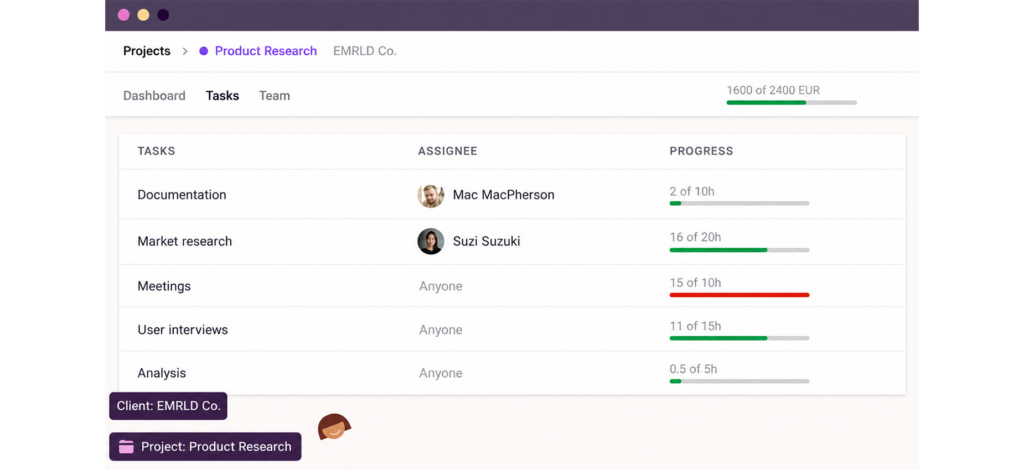
We created a workspace. The structure performed well for agencies that manage several assignments for each client. Managers could separate billable work and internal activity without creating different workspaces.
The main limitation was the mandatory project layer. A time entry could not be assigned directly to a client, so even simple client work required a project. This was manageable in our enterprise model, but freelancers with one service per client may find the hierarchy unnecessarily detailed.
Project Planning and Monitoring
Toggl Track performed best as a time-led project monitoring tool. It showed how labor was being used, but it did not replace a complete project-management platform. Teams that needed dependencies or detailed delivery workflows still required a connected project-management system.
Workforce Planning
We used tracked hours to compare workload across team members and projects. The data helped us identify uneven work distribution and employees with limited remaining capacity. This made Toggl Track useful for short-term staffing and project-allocation decisions.
For this to work, managers should therefore treat workload data as an operational indicator rather than a complete measure of employee performance.
Team, Workspace, and Timesheet Management
Team and Workspace Administration
We tested user invitations, workspace settings, project visibility, team groups, and member administration. The setup performed well once the workspace structure had been defined. We could organize users according to teams and control which projects they could access.
Roles and Access Control
To test the access control, we assigned different permissions to all parties included. The available roles provided enough separation for most professional-services workflows. Project managers could oversee assigned work without receiving control over the entire organization.
Timesheet Approval Workflows
We tested weekly timesheet submission and approval through the Premium plan. Employees could send completed timesheets to an assigned approver, while managers could review entries before accepting or rejecting them.
The workflow performed well for weekly payroll preparation and client billing. However, it is more suitable for organizations that follow a regular weekly cycle. Businesses with unusual approval periods may need to adapt their internal process.
Reporting and Analytics
Standard Reports
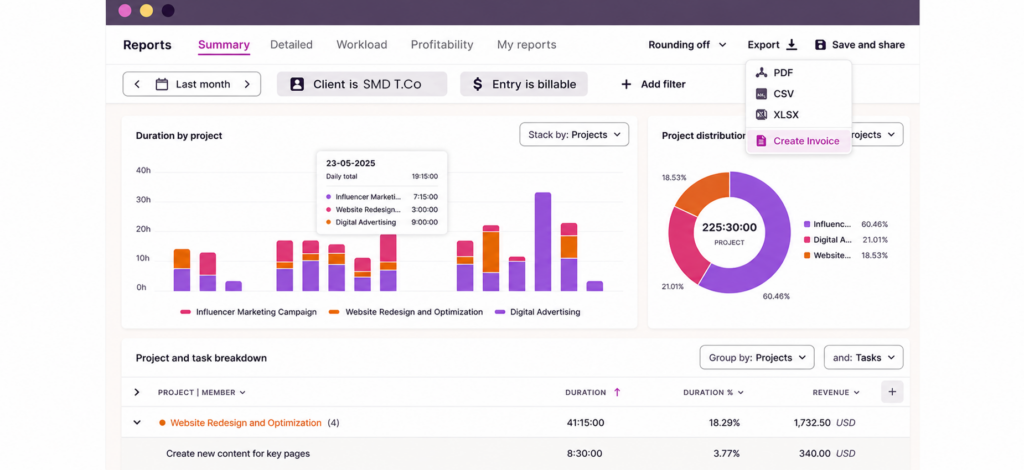
We tested summary and detailed reports with filters. The reports performed well when we needed a quick view of where time had been spent. They were also clear enough to share with managers or clients.
PDF exports were useful for presentation, while CSV and Excel files supported deeper analysis. However, CSV and Excel exports require a paid plan.
Project and Performance Analytics
We used tracked data to examine project effort and profitability. This was one of Toggl Track’s strongest business features. Managers could compare project performance and identify work that consumed more time than its commercial value justified.
Billing, Costs, and Financial Management
Billable Time and Rates
We assigned billable status and rates at different levels of the workspace. Toggl Track could apply rates to projects and team members, which supported clients with different pricing arrangements.
The feature performed well for tracking billable value, but billable does not always mean invoiced. Teams still need a clear process for identifying which hours have already appeared on an invoice. This distinction becomes important when billing occurs several times within the same reporting period.
Costs, Revenue, and Profitability
We added labor costs and billable rates to compare project revenue with the cost of delivery. The profitability report provided a useful breakdown. It helped show whether low-margin work resulted from pricing, staffing, or excessive time use. This feature was most useful for agencies and consultancies with accurate internal cost data.
Invoicing and Accounting
We created invoices from tracked hours and report data. Toggl Track automatically transferred the time quantity and billable amount into an editable invoice. The feature performed well for straightforward time-based billing.
Toggl Track Pros and Cons
Toggl Track Pros
- Manual entries also supported employees who completed their timesheets later.
- Timeline, idle detection, reminders, and calendar connections helped users recover forgotten time without automatically sharing their full activity history with managers.
- The desktop app stored entries locally and synchronized them after the internet connection returned.
- Summary, detailed, workload, and profitability reports provided useful insights into time allocation, project performance, and business costs.
- Roles, permissions, project visibility, team groups, and timesheet approvals provided enough control for most professional-services environments.
- Billable rates, labor costs, profitability reports, exports, and invoice creation made Toggl Track useful for agencies, consultants, and other time-based businesses.
Toggl Track Cons
- Editing forgotten or inaccurate records was less direct than starting a timer, particularly when changes involved several entries or views.
- Users cannot assign time directly to a client. This additional layer may feel unnecessary for freelancers who manage one ongoing service for each client.
- The web, desktop, mobile, and browser versions do not provide the same level of reporting, administration, or workflow control.
- Entries are stored locally until synchronization finishes. Logging out or clearing app data too early can place unsynced records at risk.
- Toggl Track app can calculate billable value, but teams may still need a separate process to identify which entries have already been included on an invoice.
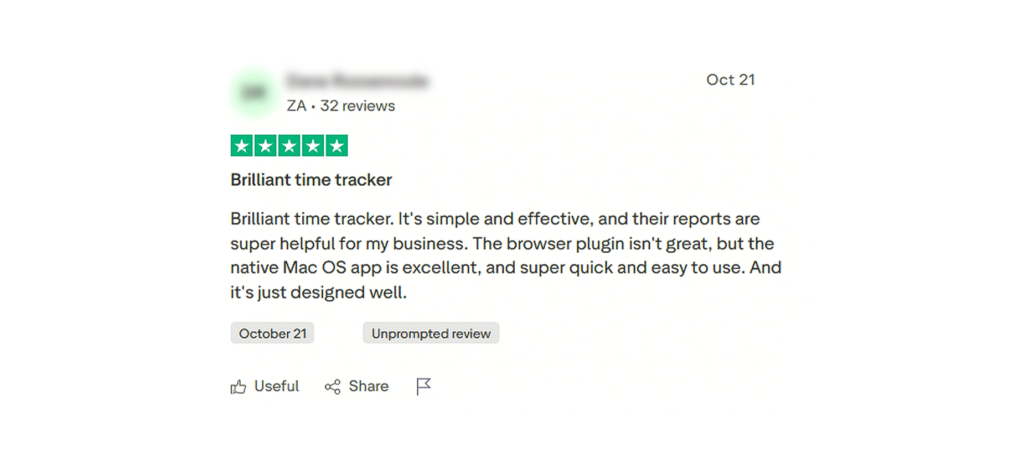
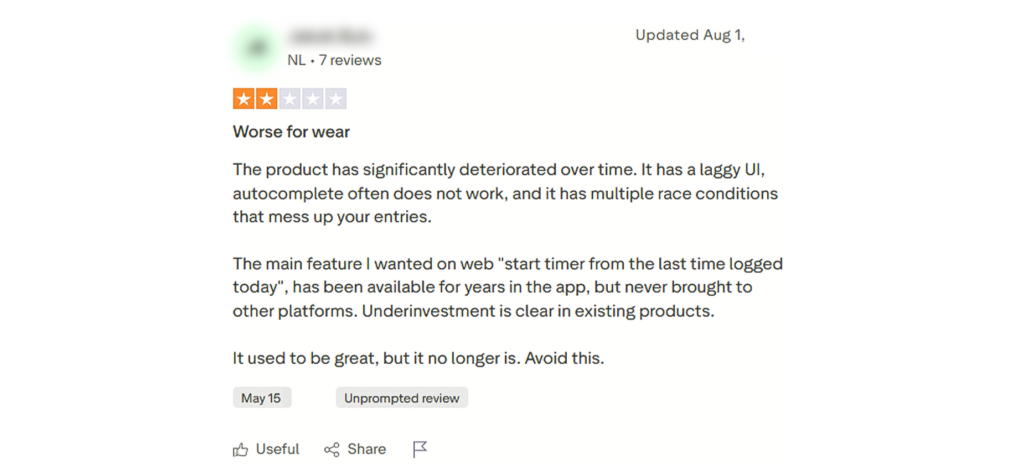
Toggl Track Reviews: Real Customers
When Toggl Track Isn’t the Right Fit
Toggl Track works well for businesses that need simple time capture and project reporting. Its privacy-first approach also suits companies that prefer voluntary tracking without screenshots or continuous employee surveillance.
However, this approach limits the visibility managers receive. Toggl Track does not provide screenshots, location tracking, or direct website and application monitoring. Its Timeline records activity privately, and managers only see information that the user converts into a shared time entry.
For this reason, Toggl Track may not be enough for businesses that need to verify remote attendance, compare active and idle time, calculate payroll from recorded hours, or examine how employees use workplace applications.
TimeBee is a more relevant option for these requirements because it combines time tracking with workforce monitoring and financial management.
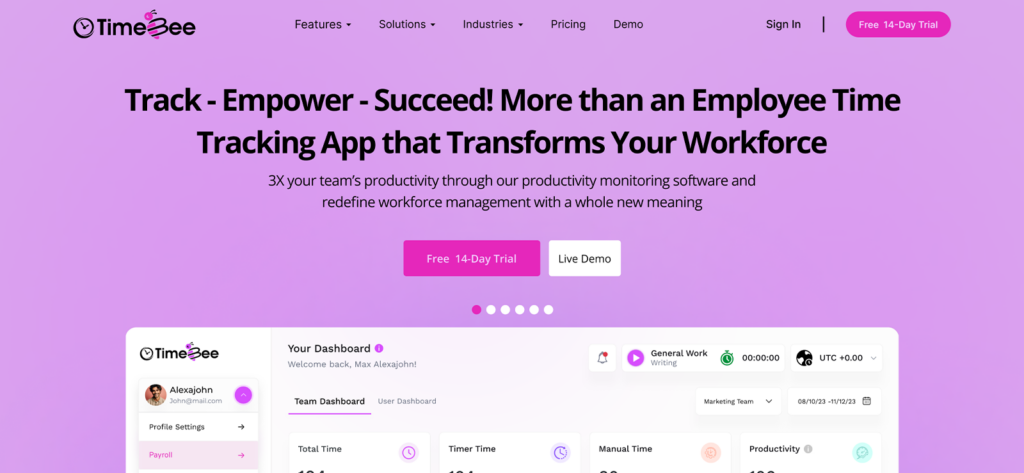
Its most useful features include:
- Employee screenshots: TimeBee periodically captures employees’ screens while the timer is active. As a result, managers can review screenshots and understand how recorded hours were used.
- Website and application monitoring: The platform records the websites and applications employees use during tracked hours. This allows management to identify the tools that support work and the activities that cause distractions.
- Activity and idle-time tracking: TimeBee uses keyboard and mouse activity to distinguish active work from idle periods. In addition, customizable distraction alerts can prompt employees when inactivity exceeds the organization’s selected limit.
- Attendance management: Attendance reports provide managers with clearer evidence of employee attendance than a voluntary project timer alone.
- Payroll calculation: TimeBee calculates employee pay using tracked hours and assigned hourly rates. Therefore, businesses do not need to transfer approved working hours manually into a separate payroll calculation process.
- Client billing and project profitability: Businesses can connect billable hours with project costs and profitability reports. This helps managers compare the cost of delivering work with the revenue generated from each project.
Together, these features make TimeBee more relevant for remote and distributed teams that require stronger attendance verification and activity evidence. They also connect workforce records with client billing and project costs through one system.
Ultimately, Toggl Track is the better fit when voluntary time capture and privacy-focused project analysis are the priority. TimeBee, on the other hand, is more suitable when businesses need closer operational oversight and direct evidence of how recorded working hours are used.
Final Verdict
Toggl Track is a feasible option for freelancers and professional service teams that need simple time capture with clear project reporting. Its timer is easy to use. Its reports provide useful insight into billable work and project profitability. The platform also supports flexible work across web and desktop environments.
However, Toggl Track is less suitable for companies that need screenshots or direct application monitoring. It also falls short for businesses that require detailed attendance controls or built-in payroll calculations. Some advanced reporting and approval features are only available on paid plans.
Overall, Toggl Track fits trust-based workplaces that value project visibility over employee surveillance. Buyers should compare their reporting and monitoring needs before selecting a plan.
FAQs
How does Toggl Track handle different time zones for distributed teams?
Toggl Track uses each device’s system time when recording entries. Reports use the time zone selected in each user’s profile. Scheduled reports also follow the recipient’s configured time zone. Distributed teams should therefore ensure that every member sets the correct profile and device time zones to prevent reporting offsets. You can get more information on this from the Toggl Track official site.
Can external contractors access Toggl Track without seeing company-wide data?
Yes. Administrators can invite contractors as regular workspace users and assign them only to relevant private projects. Regular users can view their own tracked time and the projects available to them. Companies should avoid unnecessary administrator access and review public-project settings because public projects may expose broader time-entry data.
Does Toggl Track maintain an audit trail for edited or deleted time entries?
Toggl Track provides an Audit Log on Premium and Enterprise plans. It records when data changed and identifies the person responsible. However, the time-entry log only covers entries created or modified by someone other than the entry owner. Audit events were available for one year and cannot currently be exported.
How long does Toggl Track retain workspace and account data?
Toggl Track does not apply one retention period to every data type. Billing and tax records may remain for at least seven years. Backups and system logs are generally retained for up to 90 days. Free workspaces with no new or edited time entries for six months may be deleted after email warnings. Paid workspaces are excluded from this inactivity policy.
What happens to company data after canceling a Toggl Track subscription?
Canceling a Toggl Track subscription does not immediately delete company data. Paid features are available until the billing period ends. The organization then moves to the Toggl Track Free plan if it meets the user limit. Otherwise, access may be suspended until administrators reduce active users. Export important records before leaving permanently.
Connect Employee Activity to Business Outcomes With TimeBee
Buy Now

Jacob Tyler
Member since July 2, 2026
Jacob Tyler
Member since July 2, 2026
Jacob Tyler is a B2B technology journalist specializing in workplace software, employee monitoring platforms, productivity technology, HR systems, data privacy, and the changing role of technology in modern organizations.
He holds an MSc in Information Systems from the University of Manchester. His professional qualifications include the CompTIA Data+ certification.
With more than 10 years of experience covering B2B software and digital transformation, Jacob focuses on translating complex product capabilities into clear guidance for business readers.
His work examines how software functions in practice, which operational problems it is designed to address, what data it collects, and what organizations should consider before implementation.
Through his writing, Jacob helps HR leaders, operations teams, founders, managers, and IT decision-makers understand workplace technology and make informed purchasing decisions.