

Time Management for Lawyers: 11 Strategies to Balance Clients, Cases, and Court
By Frank Oliver
August 27, 2026 12 min readA lawyer’s day rarely follows a clean to-do list. Court dates are fixed while clients expect timely answers, and once you handle all of that, you have a pile of documentation to complete. Add an unexpected filing issue or an urgent client request, and even a carefully planned day can change within minutes.
That is why I view time management for attorneys as more than a question of personal productivity. From an operational perspective, it is about designing a workload that can absorb competing demands without allowing every new request to disrupt the flow.
For your law firm, effective time management starts with creating a workload that reflects how legal work actually happens. To do so, you need to prioritize work with the greatest consequences and protect enough capacity for substantive legal tasks, all while leaving room for the unexpected demands that can interfere with your day.
The strategies below focus on building that kind of workable system rather than relying on generic advice.
A Lawyer’s 11-Point Time Management Framework in Under a Minute
- Priority: Focus on the work with the greatest legal or client consequence.
- Work Backward: Build milestones from the final deadline toward today.
- Monitoring Working Hours: Track where billable and non-billable time is actually going.
- Block the Work: Reserve calendar time for specific legal outputs.
- Keep a Cushion: Leave capacity for urgent and unplanned matters.
- Batch Communication: Group routine client contact into manageable windows.
- Match Work to Role: Keep legal judgment with lawyers and delegate suitable support work.
- Protect Focus: Preserve uninterrupted time for complex substantive work.
- Automate the Routine: Use technology for repeatable administrative processes.
- Create Earlier Cutoffs: Finish key work before the external deadline.
- Review and Reset: Reassess priorities, deadlines, and workload daily and weekly.
Why Time Management is Different for Lawyers
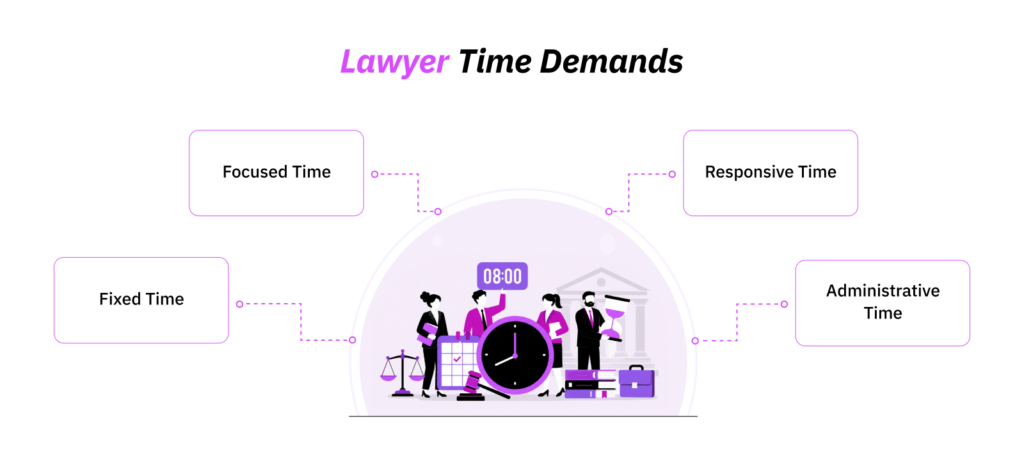
A lawyer typically has their hands full, as most legal workloads combine four different demands, each competing for the same level of attention.
1. Fixed Time
This is work tied to deadlines or events that are difficult or impossible to move. It can include court appearances, filing dates, limitation periods, closings, hearings, etc.
Because these commitments have the least flexibility, they usually form the anchors around which the rest of the workload must be planned.
2. Focused Time
This is the substantive legal work that requires sustained attention, such as drafting, research, discovery review, due diligence, negotiation preparation, and case strategy.
The difficulty is that focused work often does not appear urgent until its deadline gets closer. If lawyers repeatedly allow meetings or administrative work to displace it, important work can quickly become last-minute work.
3. Responsive Time
Client calls, emails, partner requests, opposing counsel, and unexpected developments all fall into this category.
Some of this work genuinely requires an immediate response. Much of it does not. The challenge is staying responsive enough to serve clients effectively without letting every incoming request dictate the day’s priorities.
4. Administrative Time
Lawyers also spend working hours on billing, time entry, internal meetings, supervision, scheduling, business development, and other responsibilities that may not be directly billable.
These activities are necessary, but they still consume the same finite capacity available for client and casework, which is exactly why an average firm generates only 3 billable hours out of an average 8-hour shift.
Effective time management, therefore, starts with keeping these four demands in balance rather than simply trying to fit more work into the same number of hours.
11 Smart Strategies for Better Time Management for Attorneys
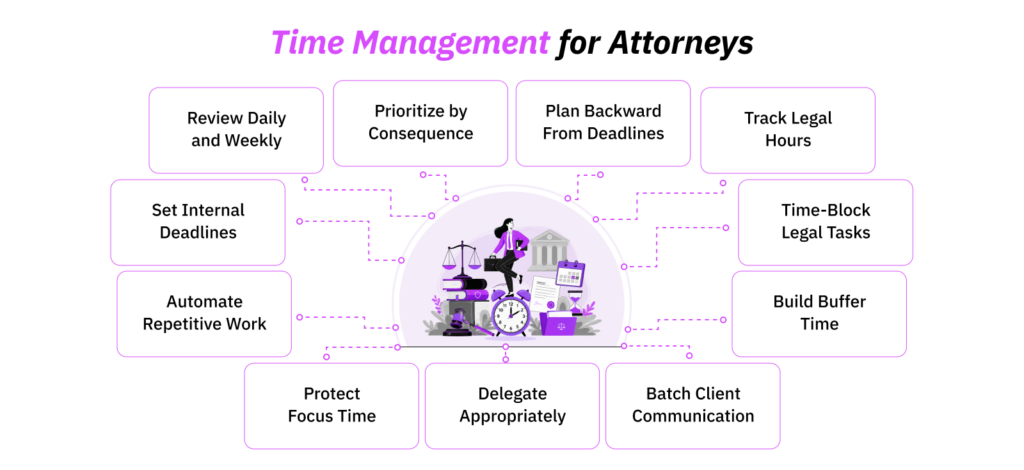
These 11 time management strategies for lawyers can help you get through the day without being pulled in 10 different directions.
1. Prioritize Work by Consequence, Not Just Urgency
When several matters need attention at once, prioritize them according to what happens if the work is delayed, not simply which task appears most urgent.
For a law firm, a practical hierarchy often looks like this:
- Court, statutory, regulatory, and other immovable external deadlines
- High-consequence client commitments
- Substantive work required for upcoming matters
- Routine client and internal communication
- Administrative work that can be rescheduled safely
This does not mean every court-related task automatically outranks everything else. Rather, you should consider three variables together: consequence, deadline flexibility, and dependency.
Suppose you begin Monday with a filing due Tuesday, research needed for a hearing the following week, three routine client updates, and an internal reporting request. The filing ordinarily receives priority because the deadline is immediate and the consequence of delay is high.
However, you should also reserve time for the following week’s research before it becomes Thursday’s emergency.
2. Plan Backward From Court Dates and Major Matter Deadlines
A legal deadline should be treated as the end of a workflow, not as the date on which the work needs to begin.
If a filing is due Friday, for example, a simple backward plan might look like this:
- Friday: file or submit
- Thursday: final legal and formatting review
- Wednesday: incorporate revisions
- Tuesday: complete first full draft
- Monday: finish supporting research and evidence gathering
- Prior week: obtain information from clients, witnesses, colleagues, or third parties
The dates will vary according to the matter, but the principle is consistent: give every major dependency its own internal milestone.
This is particularly important when the attorney cannot control the entire workflow. A draft may require partner approval, or a transaction may depend on client instructions. If those dependencies are only discovered close to the external deadline, chaos can become inevitable.
From a process-design perspective, I would therefore ask two questions when a major deadline enters the calendar:
“What has to happen before this can be completed?”
And:
“Who or what could delay those steps?”
By simply answering those questions, you can convert a single deadline into a manageable sequence of work.
3. Use a Time Tracker to Get Better Visibility Into Legal Hours
You cannot manage a law firm’s capacity effectively if you only know that everyone is “busy.”
A time tracker gives you a more useful view by showing which clients, matters, tasks, and non-billable responsibilities are consuming those hours. That matters for both workload planning and billing.
As far as my experience goes, I have used TimeBee at a company I worked with to manage a team of 86 on-site and 47 remote employees. The software can track time across projects and individual tasks. You can, hence, record time data around categories like:
- legal research;
- drafting;
- document review;
- client calls;
- court preparation;
- internal meetings;
- supervision;
- billing and administration;
- business development.
Other than this, TimeBee also separates billable from non-billable project hours, produces itemized timesheets, applies different billing rates to client projects, and provides project-level reports.
However, more than the data you have in hand, it is important what you do with that information.
If a matter took 22 hours when similar matters normally require 14, the data does not prove that the lawyer was inefficient. The matter may have been unusually complex, client instructions may have changed, documents may have required substantial rework, or the lawyer may have been waiting on incomplete information.
That is why I treat time data as more of a diagnostic measure because better time visibility allows the firm to investigate why that work exists and whether the billing process can be simplified.
4. Time-Block Specific Legal Tasks
When it comes to legal task management, time blocking is one of the most efficient ways. It becomes more useful for lawyers when the calendar describes what needs to be produced, not merely which client or matter receives attention.
For example:
- Less useful:
- 9:00–11:00: Matter A
- More useful:
- 9:00–10:15: Draft Matter A motion
10:15–11:00: Review supporting authorities
The second version creates a clearer expectation of progress and makes it easier to estimate whether the available time is realistic.
You can also match different categories of work to different parts of the day. If you concentrate best in the morning, protect those hours for drafting, analysis, research, or strategy and move routine email or administration elsewhere.
Most importantly, do not fill every available calendar block simply because time blocking makes that possible. A lawyer whose calendar is booked from 8:00 to 6:00 has no window to deal with an unexpected issue other than displacing something else.
And this very point leads us directly to the next strategy.
5. Build Buffer Time for Unexpected Work
I would call a completely full legal calendar a ‘fragile calendar.’ Why? Well, law firms deal with work that cannot always be predicted precisely: urgent client instructions, unexpected court developments, negotiations that run longer than planned, last-minute document issues, partner requests, or information that arrives later than expected.
Therefore, I would treat buffer capacity as part of the plan, not as unused time.
You can do so in multiple different ways. For instance, reserve one flexible block late in the day, several smaller windows between major tasks, or additional capacity around deadline-heavy periods.
However, it is important for you to review what consumes that buffer.
If a four-week review shows that most “unexpected” work consists of the same type of late client request or internal approval problem, it may no longer be genuinely unpredictable. You may have identified a process issue that can be addressed upstream.
That is one of the most valuable lessons I have taken throughout my experience as an operations consultant: resilience is not only about creating spare capacity; it is also about learning why you keep needing it.
TimeBee: Turn Legal Hours Into Actionable Visibility
Learn More
6. Batch Routine Client Communication
Lawyers cannot simply turn off communication for half the day and assume clients will accommodate them. However, not every email requires an immediate response.
A better approach is to distinguish routine communication from genuine escalation.
For example, your firm could create defined periods for:
- non-urgent email;
- client callbacks;
- status updates;
- routine internal questions.
At the same time, clients and team members should know how to escalate something that genuinely requires immediate attention.
The distinction matters because frequent switching can add cognitive overhead. Research summarized by the American Psychological Association has consistently found measurable switching costs when people move repeatedly between tasks, particularly complex ones.
7. Delegate Work at the Right Level
Delegation saves time only when work moves to the appropriate level of expertise and responsibility. Therefore, before starting a task, you should always ask yourself whether this task requires a lawyer’s legal judgment or not.
If the answer is no, consider whether it can appropriately be handled by a paralegal or another team member.
Depending on jurisdiction, role, supervision requirements, and firm policy, this might include parts of:
- document organization;
- scheduling;
- routine information gathering;
- template preparation;
- administrative correspondence;
- matter setup;
- billing administration;
- research support.
By contrast, professional judgment, final legal advice, strategic decisions, and other non-delegable responsibilities should remain with the appropriate lawyer.
8. Designate Time for Drafting, Research, and Case Strategy
Some legal work, like drafting arguments or preparing a case study, cannot be completed effectively in the five-minute spaces between calls.
Therefore, designate protected periods specifically for such work.
This differs from ordinary time blocking. Time blocking tells you when a task will happen; protected focus time establishes the conditions under which complex work can happen effectively.
I also would not attempt to eliminate every interruption. That is unrealistic in many legal roles. The practical objective is therefore to protect lawyers from avoidable switching while maintaining the responsiveness their roles require.
9. Automate Repetitive Legal Workflows
Automation is most useful when you apply it to a process that is repetitive, predictable, and rules-based.
Depending on the firm’s systems and professional obligations, potential areas include:
- calendar reminders;
- matter intake;
- recurring workflow notifications;
- scheduling;
- document templates;
- standard administrative forms;
- time capture;
- invoice preparation;
- status reporting;
- routine data transfer between systems.
However, I recommend examining the workflow before automating it. To do so, you need to find answers to the following questions:
- Does this step still need to exist?
- Is the same information being entered more than once?
- Are unnecessary approvals slowing the process?
- Is work repeatedly being handed between too many people?
- Where does rework normally occur?
Automating a poor process may simply make the same inefficiency happen faster.
Law firms also need stronger controls than many ordinary businesses when technology handles client information or contributes to legal work. In the United States, for example, ABA Formal Opinion 512 states that lawyers using generative AI must consider duties involving competence, confidentiality, client communication, supervision, candor, and reasonable fees.
Therefore, automation should remove unnecessary administration without outsourcing the lawyer’s professional judgment or bypassing required review.
10. Set Internal Deadlines Before the Actual Legal Deadline
An internal deadline creates a controlled margin between finishing the work and having to deliver it.
That margin is important because legal work often goes through review, revision, client approval, formatting, filing, or quality-control stages after the substantive work appears to be finished.
For example, if a document must be filed Friday at 5:00 p.m., the firm’s internal completion deadline might be Wednesday afternoon. Thursday then becomes review and revision time rather than the day on which the first complete draft appears.
Internal deadlines are also particularly useful where several people contribute to the same output. Instead of telling every participant that “the filing is due Friday,” assign separate dates for research, drafting, partner review, client input, final edits, and filing. This creates visibility into slippage while there is still time to respond.
11. Run Daily and Weekly Reviews
A legal workload changes too quickly for a plan made on Monday morning to remain accurate until Friday.
Use a short daily review to check:
- tomorrow’s fixed obligations;
- immediate deadlines;
- highest-priority substantive work;
- outstanding client responses;
- delegated tasks that require follow-up;
- time that still needs to be recorded.
Then use a broader weekly review to look further ahead across all active matters. For this part, I would include:
- court and filing dates;
- client commitments;
- major work due over the next few weeks;
- tasks waiting on another person;
- upcoming capacity constraints;
- work repeatedly being postponed;
- recurring interruptions;
- matters that are using more time than expected.
The weekly review is where time management for lawyers becomes process improvement.
How so? Think about it. If you find the reason behind the change of plan for a week, and the answer comes out to be an unpredictable court development, the buffer did its job.
However, if the answer was the same approval delay, administrative bottleneck, or late internal request for the fourth week in a row, the firm has found something more useful than a scheduling problem. It has found a process worth fixing.
When Lawyer Time Management Actually Becomes a Process Problem: 5 Warning Signs
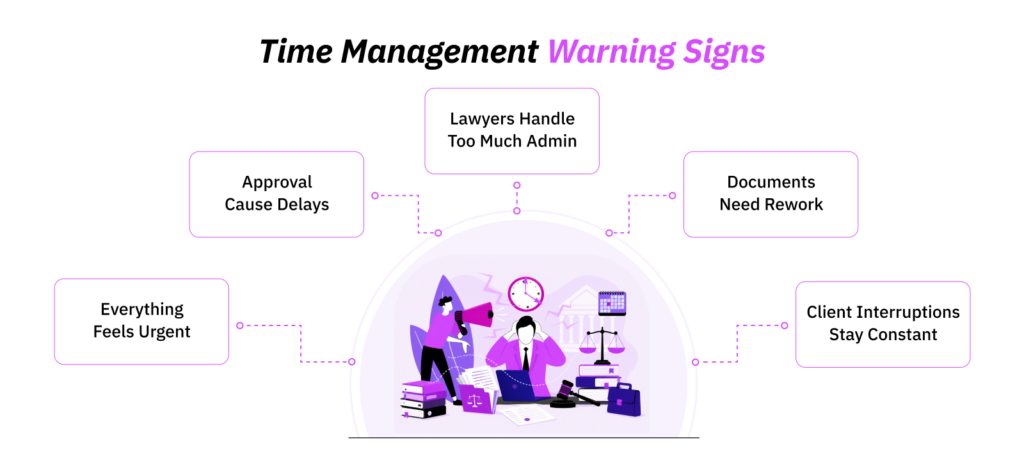
Some time-management problems belong to individuals. Others are symptoms of how the law firm has designed its work.
To find out what is happening, a useful test, in my opinion, is recurrence. If the same problem affects several lawyers, several matters, or several consecutive weeks, you need to investigate the workflow before concluding that everyone needs another productivity technique.
Here are some warning signs to look out for:
1. Everything is Treated As Urgent
When every request is marked urgent, lawyers lose a reliable way to distinguish genuine priority work from ordinary demand.
This often happens when a firm has no shared framework for prioritization. Clients, partners, associates, and support functions naturally view work from their own perspective, so whoever asks most recently or most forcefully can end up setting the schedule.
2. Work Repeatedly Waits for Approval
A lawyer may appear to be moving slowly when the work is actually sitting in someone else’s queue.
For example, an associate completes a draft Tuesday, but partner review does not occur until Thursday afternoon. The associate then receives revisions shortly before Friday’s deadline and has to rearrange the rest of the day.
If that happens once, it may simply be a busy week. If it happens repeatedly, you need to examine the approval process.
3. Lawyers Perform Large Amounts of Administration
When expensive legal capacity is routinely consumed by work that does not require legal judgment, the firm should examine how responsibilities are allocated.
A lawyer may need to perform certain administrative tasks because of professional requirements or the specifics of a matter. The problem arises when lawyers repeatedly handle scheduling, repetitive data entry, routine document administration, billing corrections, or other work that could appropriately be delegated or automated.
4. Documents Require Repeated Rework
Rework consumes time without necessarily creating proportionate client value.
If legal documents repeatedly return for extensive corrections, look at the causes.
Were the original instructions clear? Was the right precedent used? Did important information arrive late? Did client requirements change? Are different reviewers applying inconsistent standards? Is the firm’s template outdated?
In transformation work, I have learned that recurring rework is often one of the clearest signals that time is being lost between people and process stages, rather than within the visible task itself.
5. Client Interruptions Are Constant
Frequent client communication is not inherently a problem. The warning sign is when unplanned contact repeatedly disrupts scheduled legal work across multiple matters or lawyers.
Look for patterns such as:
- clients repeatedly contacting the firm for basic status updates;
- routine questions being treated as urgent;
- several team members responding separately to the same client;
- lawyers regularly abandoning focused work to handle non-critical requests;
- the same clients or matter types generating disproportionate interruptions.
Conclusion
Efficient lawyer time management comes down to creating enough structure to keep important work moving without making the day rigid.
When priorities are clear, and workload patterns are visible, lawyers can make better decisions about where their attention should go and where delays are starting to build. Just as importantly, recurring pressure often reveals weaknesses in the way work is assigned, reviewed, or communicated.
The strongest approach, therefore, is not simply to work faster. It is to build a legal workflow that stays workable when demands change.
FAQs
What is legal task management?
Legal task management is the process of organizing, assigning, tracking, and completing the work required to move legal matters forward. It gives firms visibility into deadlines, ownership, dependencies, and progress across cases. Unlike a personal to-do list, it connects individual tasks to clients, matters, and broader workflows. This, in turn, helps lawyers coordinate work more consistently and reduce the risk of missed or duplicated activity.
How do lawyers prioritize multiple cases at once?
Lawyers can prioritize multiple cases by weighing deadline flexibility, legal consequence, client impact, and task dependencies. Fixed court or statutory deadlines usually come first, followed by work that affects major client commitments or unlocks later stages of a matter. The key is to review priorities across the full caseload rather than allowing the newest request to automatically become the most important one.
How can lawyers manage billable and non-billable hours separately?
Lawyers can separate billable and non-billable hours by using time-tracking software to record activities against the correct client, matter, or internal category as the work occurs. Billable work might include drafting, research, or client calls, while non-billable time may cover administration, internal meetings, training, or business development. Tracking both separately helps firms understand not just what can be invoiced, but where overall capacity is being consumed.
How should lawyers manage emails and client interruptions?
Lawyers should separate routine communication from genuinely time-sensitive requests. Non-urgent emails, callbacks, and status updates can often be handled in defined windows, while urgent matters should have a clear escalation route. This approach helps preserve concentration without reducing responsiveness. If interruptions remain constant, the pattern may indicate unclear expectations, weak matter visibility, or inconsistent ownership rather than a simple scheduling problem.
What tasks should lawyers automate?
Lawyers should automate repetitive, rules-based tasks that do not require independent legal judgment. Common examples include reminders, scheduling, intake steps, document templates, workflow notifications, time capture, and routine reporting. Before automating, firms should confirm that the underlying process is necessary and efficient. Any tool handling client information or supporting legal work should also be used with appropriate security, confidentiality, review, and supervision controls.
Get a Clearer View of Every Legal Hour With TimeBee
Try TimeBee
Frank Oliver
Member since July 8, 2026
Frank Oliver
Member since July 8, 2026
Frank Oliver is a Principal Consultant in Operations and Transformation, specializing in process improvement, digital transformation, operational performance, and the implementation of workplace technology.
He holds an MSc in Operations, Project and Supply Chain Management from The University of Manchester. He is also a Project Management Professional and a Prosci Certified Change Practitioner.
Overall, with more than 15 years of experience, Frank focuses on helping businesses identify the systems and workflows that influence productivity. His work further examines how processes, technology, management practices, role clarity, and data quality interact to affect organizational performance.